
Participating Frequently
February 13, 2018
Question

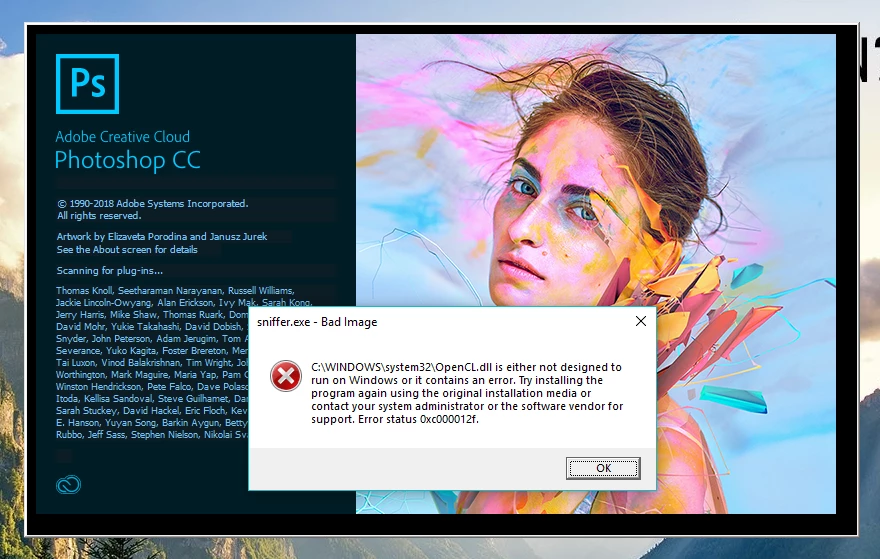
I get this error every time Photoshop opens up... "Bad Image"

  • February 13, 2018
  • 1 reply
  • 1782 views

I have been getting this every time I open Photoshop. I've reinstalled/updated it 3 times I believe so far. Same issue persists. Anyone know what this is? I've googled it and looked on this forum and there's nothing about it anywhere.
    This topic has been closed for replies.

    1 reply

    davescm
    Community Expert
    Community Expert
    February 13, 2018

    Hi

    I have not seen that in Photoshop but I did have a those errors last year in Lightroom and Techsmith's Camtasia. It turned out my Antivirus software (McAffee)  was detecting false positives and setting the file size of certain files to 0 bytes. I re-installed the files and a few days later the same occurred again. I ran various scans using several tools which showed no issues and in the end I switched antivirus apps and have had no issues since.

    Do a search for sniffer.exe and check C:\Windows\System32\OpenCL.dll and see if either have been given a 0 bytes file size. Sniffer is installed by Adobe, the OpenCL file should be re-installed if you update your GPU driver package.

    Dave

    Participant
    March 17, 2018

    I still facing the same problem after trying your suggestion

    davescm
    Community Expert
    Community Expert
    March 17, 2018

    Hi

    Did you re-install the specific file highlighted in the error message?

    Dave