
Participant
June 11, 2018
Answered

I have a problem with my wacom tablet pressure curve/threshold setting

  • June 11, 2018
  • 2 replies
  • 1313 views

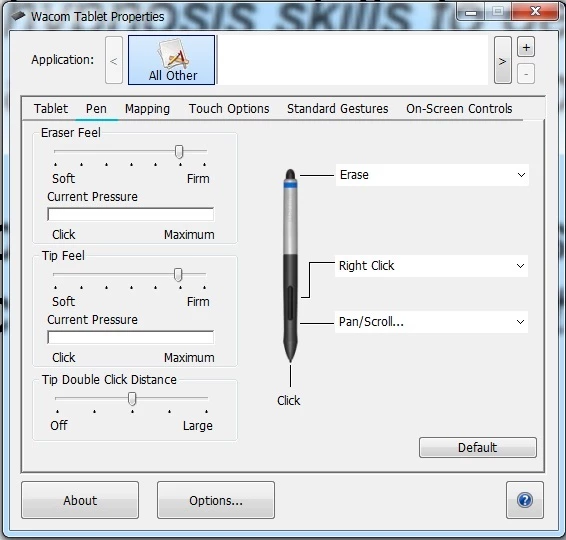
In tablet properties there is an option to adjust the setting of the pen "tip feel", from "soft" to "firm". (Screenshoot added). The problem is that, this vital option suddenly stopped working -- the system simply doesn't react to the changes I make there. I tried reinstalling my driver, tried using "Tablet Pressure Curve Tool" and messing with the numbers of the tablet .dat files, nothing helps. What am I supposed to do in this situation to be able to adjust the tip feel levels?
This topic has been closed for replies.
Correct answer DaveJCummings

If you're also having issues with other graphics apps,  you might want to contact Wacom to see if they have a fix, because its probably an issue with the driver

2 replies

DaveJCummingsCommunity ExpertCorrect answer
Community Expert
June 12, 2018

If you're also having issues with other graphics apps,  you might want to contact Wacom to see if they have a fix, because its probably an issue with the driver

JJMack
Community Expert
Community Expert
June 11, 2018

What Wacom Tablet, Tablet driver, Photoshop Version and OS version are you using.  All must be configured to work together correctly.

JJMack
Participant
June 12, 2018

Windows 7, Wacom Intous, Tablet driver CTH-680 after my tablet model (though I swtiched drivers several times but it changed nothing) and the issue exists not only on Photoshop but also with Clip Studio and Sai which makes me believe it is a problem with the hardware or system rather than program compatibility. Worth to mention that before a short while everything worked just fine.

JJMack
Community Expert
Community Expert
June 12, 2018

kanade1111  wrote

Worth to mention that before a short while everything worked just fine.

Then what changed on you windows 7 system ????   Windows 7 may not have Windows 10 INK support.  If you are using a Creative Cloud version of Photoshop like Photoshop CC version 14 or newer make sure you have configured you Photoshop User ID preferences to use Wintab API.  It may be necessary. Add the PSUserConfig.txt toe yout Photoshop User ID preferences folder.

Wacom driver latest one is

JJMack