Participant
June 18, 2020
Question

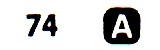
I have a small image, containing a number and a letter, the latter is in negative". How to invert?

  • June 18, 2020
  • 2 replies
  • 215 views

I'm working on a project which requires computer vision, most engines can recognise the number, but cannot recognise the letter. What is the best way to turn the letter into black on white on a large number of images? => 
This topic has been closed for replies.

2 replies

JJMack
Community Expert
Community Expert
June 19, 2020

I think if you zoom in on the  "A" you will see how poor the image quality is.  However, if all you documents are the same size and the letter location is in the same location in all your images.  You should be able to record an action that will invert the characters with better image quality then it currently has.   I have recorded such an action. To show how one may go about it.  I singled step through the action so you can see how it works and see the quality of the conversion.  All that is missing from the action is a final deselect step.  I can not post the action .atn file for the selections in it need to be relative to your document size.

JJMack
@mj
Community Expert
Community Expert
June 19, 2020

Hi GabrielAl,


Image > Adjustments > Invert would work for this task.


You should record and action so you can run a batch action to all the images.


Here's an explainer on Actions in  Ps


https://helpx.adobe.com/photoshop/using/creating-actions.html


hth

.mj