Inspiring
September 29, 2022
Answered

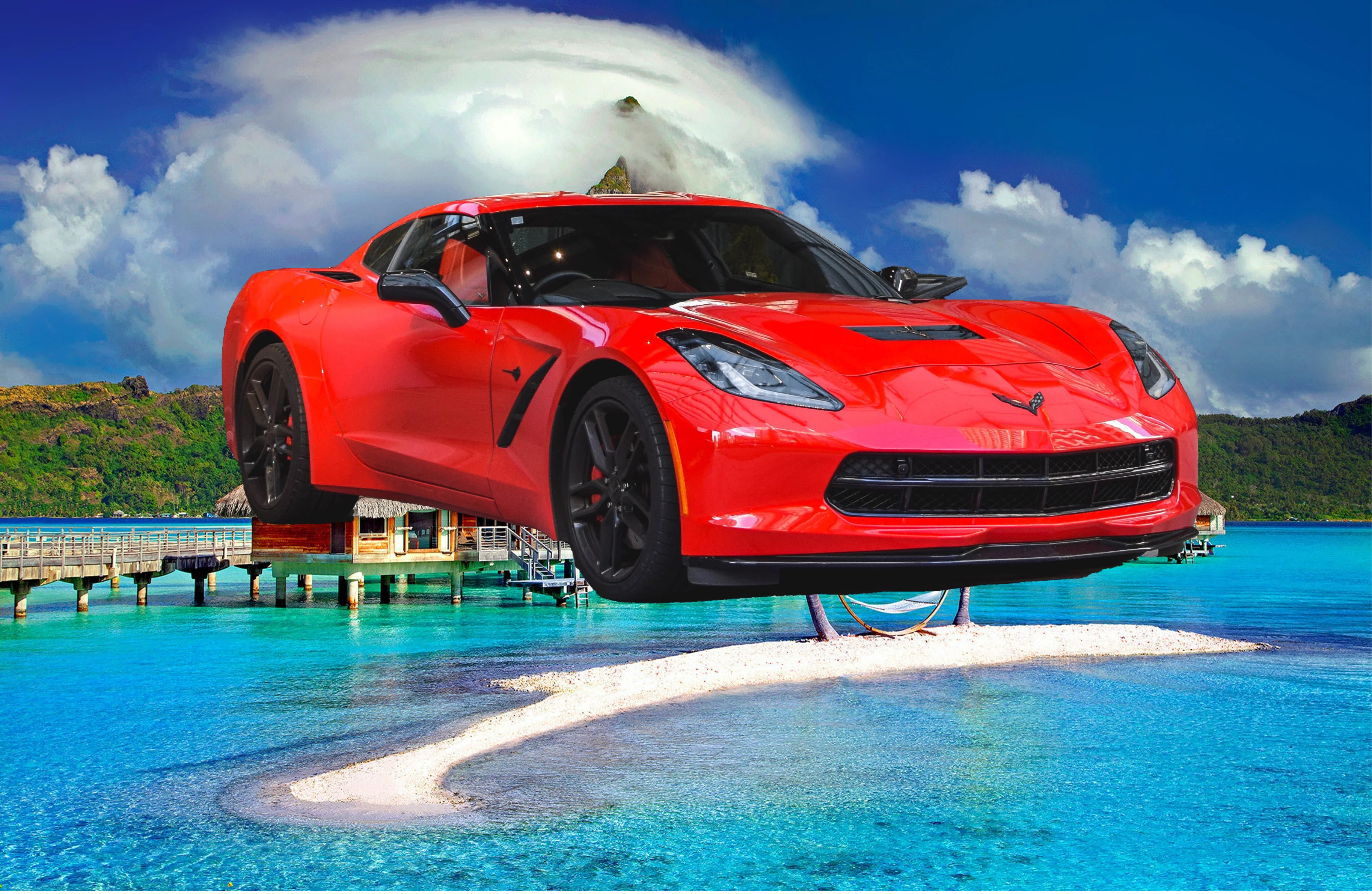
I have putted 2 images together but the car image has to be moved to the ground?

  • September 29, 2022
  • 1 reply
  • 542 views

Hello,

I have embedded 2 images together  with select object.

my first image is car and the second image is nature.

now I try to put the car on the ground when I move the car to ground I see the background of car which

I have isolated with submask.  how I can solve this problem or which steps I have to take to fix it.

thank you

This topic has been closed for replies.
Correct answer Trevor.Dennis

@johannes999 wrote:

...I have tried to find some tutorial in youtube but I couldn't find the right one...

does somebody wise me a video (1 or 2-3)that shows me how to remove background...


Try this tutorial from Jesús Ramirez of the Photoshop Training Channel:

https://photoshoptrainingchannel.com/how-to-remove-a-background-in-photoshop/


Jane


The Photoshop Training Channel is easily the best source of Photoshop video tutorials IMHO.  He nearly always manages to find details and tweaks no one else knows about.  

1 reply

davescm
Community Expert
Community Expert
September 29, 2022

If you want to sit the car realistically

The mask around the car will need adjusting to fully remove the background of the car. Select object gives a starting point but rarely gives a mask that is finished. You can paint on the mask with black to hide elements and white to reveal elements.

Then you need to move and scale the elements taking into account perspective and relevant scale. If those are off it will never look convincing.

Next lighting. To look real, the lighting on the car and lighting on the background should match in terms of direction, colour and intensity. So you will need to use masked curves to change the lighting as required.

Next shadows. The car should cast a shadow on the ground/ You can brush this in on a layer set to multiply blend mode, between the car and the background. Watch the direction - car and background elements should cast shadows in the same direction.

Finally and much more difficult, background elements should be reflected in teh car surface. This will entail warping the background over differentr areas of the car and reducing opacity so you can just see the elements reflected.


Dave

Inspiring
September 29, 2022

thank you  very much for usefull information

I have tried to find some tutorial in youtube but I couldn't find the right one.

I am all new for photoshop just a beginer and I am not interested to becom a professional . 

I am learning webdesign and I want only make some images look beter.

does somebody wise me a video (1 or 2-3)that shows me how to remove background of a car  at all that it wil not shows it again and a video that shows me how  I can remove the car in the new backgroung any where I want not the background itself?

jane-e
Community Expert
Community Expert
September 29, 2022

@johannes999 wrote:

...I have tried to find some tutorial in youtube but I couldn't find the right one...

does somebody wise me a video (1 or 2-3)that shows me how to remove background...


Try this tutorial from Jesús Ramirez of the Photoshop Training Channel:

https://photoshoptrainingchannel.com/how-to-remove-a-background-in-photoshop/


Jane