
Participant
October 23, 2022
Answered

I just want to use local storage and edit photos. Please advise.

  • October 23, 2022
  • 3 replies
  • 391 views

I recently started using photoshop and light room after being away for years.  I just want to edit my photos on local storage and save them back to local storage.  Seems simple, but I have had no luck.  Just going in circles with cloud sync. 


How do I just use the software to open a photo, alter it, and save it to my computer? 


Forgive my age and ignorance, I suppose.


Thanks in advance,

Tim
This topic has been closed for replies.
Correct answer Chris 486

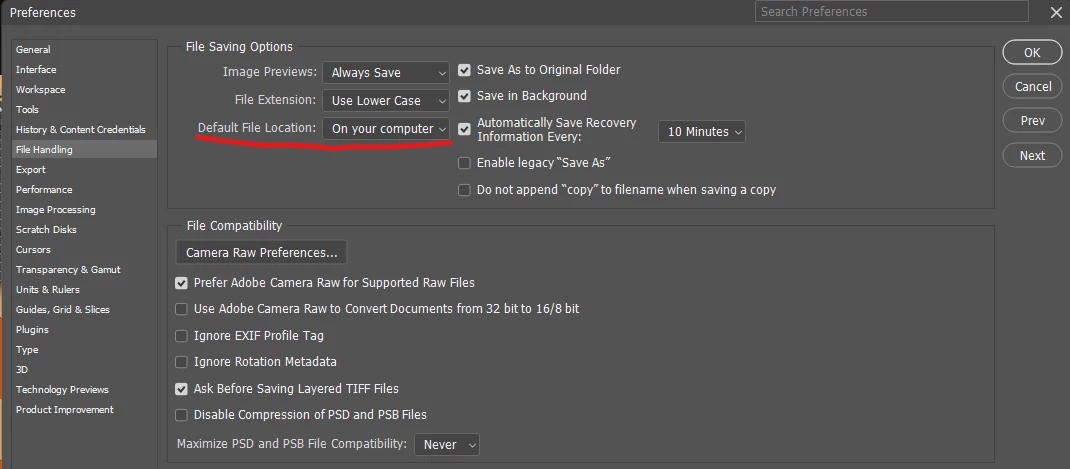
Photoshop will allow you to save files locally. In you file handling preferences, make sure You Default file location is set to "On your computer". More info on file saving here: Save files in Adobe Photoshop


Regarding lightroom, Only Lightroom Classic allows for true local work. Make sure you have that downloaded versus "Lightroom". More info: Lightroom vs. Lightroom Classic | Adobe


3 replies

Chris 486
Community Expert
Chris 486Community ExpertCorrect answer
Community Expert
October 23, 2022

Photoshop will allow you to save files locally. In you file handling preferences, make sure You Default file location is set to "On your computer". More info on file saving here: Save files in Adobe Photoshop


Regarding lightroom, Only Lightroom Classic allows for true local work. Make sure you have that downloaded versus "Lightroom". More info: Lightroom vs. Lightroom Classic | Adobe


George_F
Community Expert
Community Expert
October 23, 2022

Are you using Lightroom Classic or Lightroom Cloud?  If you've used Lightroom and Photoshop before, what was the last version you used?


I've been using Lightroom since version 5 in 2013, and not much with the basic functionality has changed since then except it's called Lightroom Classic now.  Photoshop still feels the same mostly.


There are some new features, but the overall feel should be about the same.


George F, Photographer & Forum Volunteer
kglad
Community Expert
Community Expert
October 23, 2022

<moved from cc services>