Participant
April 27, 2023
Answered

I'm having a problem converting the image to a black and white screen

  • April 27, 2023
  • 1 reply
  • 787 views

Hello community


I haven't used Photoshop for a while, even though I'm doing updates. When I open a new image and start working on it as a raw image in Camera Raw, I open the image on the Photoshop interface, but the image does not appear, but two black and white squares appear sequentially. Please help solve this problem


This topic has been closed for replies.
Correct answer Ged_Traynor

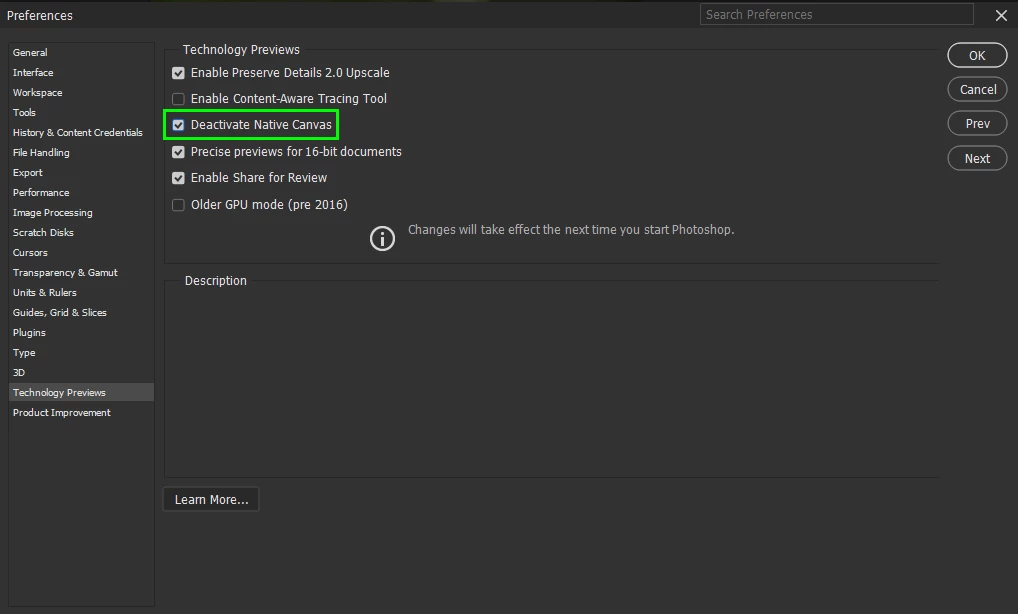
@a7mado0oz go to Edit > Preferences > Technology Previews and enable this option, then restart Photoshop
1 reply

Ged_Traynor
Community Expert
Ged_TraynorCommunity ExpertCorrect answer
Community Expert
April 27, 2023

@a7mado0oz go to Edit > Preferences > Technology Previews and enable this option, then restart Photoshop

a7mado0ozAuthor
Participant
April 27, 2023

I really don't know how to thank you, it works fine now

Thank you so much

Ged_Traynor
Community Expert
Community Expert
April 27, 2023

You're welcome