


I need to stitch two similar images together to hide a scanning issue
Hi there,
I scanned an illustration today but found that each scan had these horrible horizontal lines towards the bottom of the image. Since this is a handdrawn art commission, I want to be able to remove them with as little loss to detail as possible. I tried some blemish removal techniques but I didn't like the way they blurred the image. I also tried to use photomerge but it didn't remove the lines, just made them fainter.
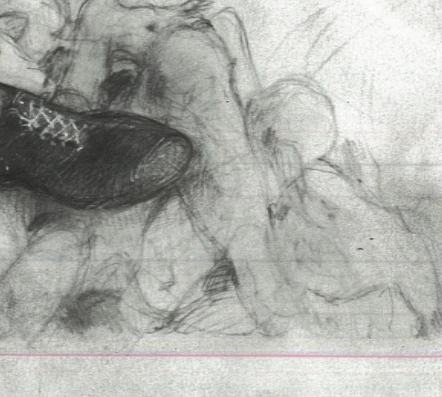
So, I'm trying to doctor this particular affected section with a 'clean' section from a different scan. It's the same area of the image, but the scans came out slightly different sizes for some reason, and I don't know how to get the alignment of this little section to exactly match the image that I'm pasting it onto. Is there any way that I can match my second scan perfectly to my first scan (in terms of size, rotation, etc) so I can get this nice clean section? Otherwise, is there another way I can remove these lines without screwing up my drawing?
Thanks
 AdChoices