Wildcat500
Inspiring
April 24, 2023
Answered

I need width x height in the toolbar

  • April 24, 2023
  • 2 replies
  • 2075 views

I am working on Windows 11 with 32 gb of RAM.  I'm using the latest in Photoshop (24.4.1).  I would like to see the width x height show up in my toolbar, but it doesn't.  Yes, I could see it in Image > Image Size, but it is easier to size the print.
This topic has been closed for replies.
Correct answer thejanebradbury

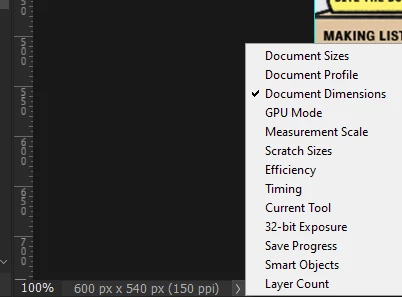
You can always see it at the bottom of the window, after the Zoom figure. If you don't see it, click the little arrow and choose Document Dimensions from the list. The x width is always first. 


2 replies

Conrad_C
Community Expert
Community Expert
April 24, 2023

There are two more alternatives, depending on how you like to arrange your workspace.


Document Dimensions is also in the Info panel, if you enable it by choosing Panel Options from the Info panel menu.


Canvas W and H is the first readout in the Properties panel when no layers are selected.


If you want document dimensions to always be visible no matter which panels are open or what’s selected, then the status bar at the bottom is still the best and most compact place to show it.

Wildcat500
Inspiring
April 24, 2023
Thank you. This is more what I wanted. But I'm just a little bit
confused. You've got the Document Dimensions and the Panel Option in
capitals, but I don't see those words on any menu. Do I go Edit >
Preferences and then what?

David Rich
Conrad_C
Community Expert
Community Expert
April 24, 2023

The panel menus are not really obvious to most people, so it’s not your fault. Most panels have a menu in the top right corner that has its own commands, which are sometimes not in the main menu bar. First make sure the Info panel is open (Window > Info). Then click to open the panel menu for the Info panel (circled), and choose Panel Options. When the Panel Options dialog box opens, you can enable the display of Document Dimensions and anything else it offers that you want to monitor.


thejanebradbury
Community Expert
thejanebradburyCommunity ExpertCorrect answer
Community Expert
April 24, 2023

You can always see it at the bottom of the window, after the Zoom figure. If you don't see it, click the little arrow and choose Document Dimensions from the list. The x width is always first. 


Wildcat500
Inspiring
April 24, 2023
Thank you.