BrieNicole007
Participant
December 18, 2016
Answered

I updated my Photoshop CC and all of my installed content & actions are missing!!

  • December 18, 2016
  • 1 reply
  • 575 views

I updated my Photoshop today and all of the actions that I had installed are missing.  Any 'assets' that I downloaded from the Library are still there, but everything else is gone.  These are things that I paid for and will not be able to get back without buying them again (if I can even track down where I bought them from).  Has anyone had this happen to them?  Any ideas on what might have happened or if there is a way to get them back?

This topic has been closed for replies.
Correct answer Trevor.Dennis

Stephen_A_Marsh wrote:

Did you uninstall the old version?

That doesn't normally remove the presets folders.

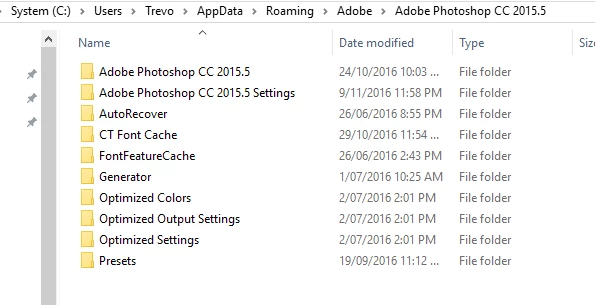
Brittany, what operating system are you using?  This page will give you the file locations.

Preference file functions, names, locations | Photoshop CC 2014

Note, if using Windows you need to make Hidden Files & Folders viewable in File Explorer. 

You'll find your actions, brushes etc. in the Presets folder for the previous version.  I'm guessing that your computer User Name won't be 'Trevor' though

1 reply

Stephen Marsh
Community Expert
Community Expert
December 18, 2016

Did you uninstall the old version?

Trevor.Dennis
Community Expert
Trevor.DennisCommunity ExpertCorrect answer
Community Expert
December 18, 2016

Stephen_A_Marsh wrote:

Did you uninstall the old version?

That doesn't normally remove the presets folders.

Brittany, what operating system are you using?  This page will give you the file locations.

Preference file functions, names, locations | Photoshop CC 2014

Note, if using Windows you need to make Hidden Files & Folders viewable in File Explorer. 

You'll find your actions, brushes etc. in the Presets folder for the previous version.  I'm guessing that your computer User Name won't be 'Trevor' though

Stephen Marsh
Community Expert
Community Expert
December 18, 2016

Trevor, where I was going with that question was that if one has access to the old version, it is easy enough to manually save out the various assets (which arguably might be wise to do before upgrading). This reminds me of a recent thread about transferring actions, when there had been no saving of the individual actions and the only actions “file” was the Actions Palette.psp file:

However or here: