
Participant
July 29, 2020
Answered

I've enabled graphics processor, but I cannot use perspective warp.

  • July 29, 2020
  • 2 replies
  • 812 views

I've updated the newest version of Photoshop 2020 (MAC) today. But I cannot use perspective warp.

The pop-off window shows, "Could not complete your request because the graphics processor must be enabled in Preferences." 

Then I tried to open Preferences-Performance, and the "Use Graphics Processor" is on. I clicked "Advanced Settings...", the Drawing Mode is Advance.


Can anyone help me with this? I need to use perspective warp. Thanks!
This topic has been closed for replies.
Correct answer

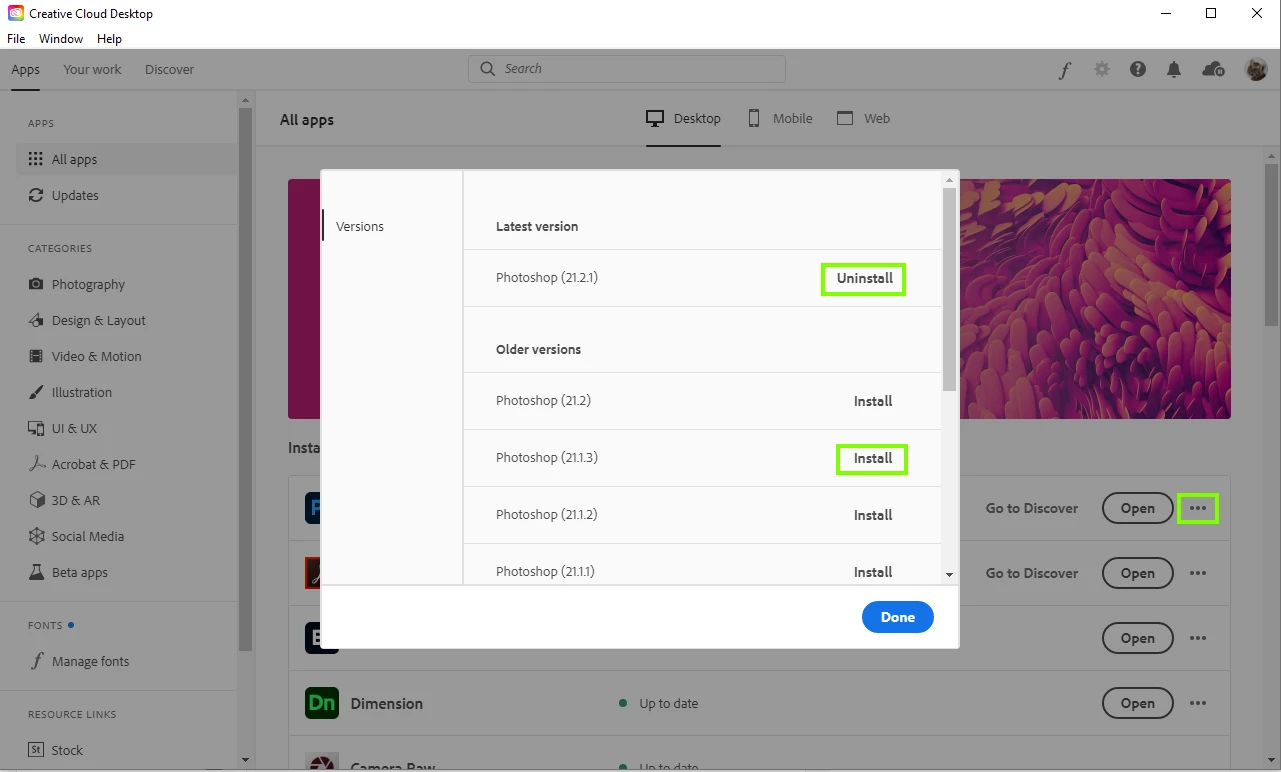
I'm afraid the only option you have at the moment is to revert back to version 21.1.3, you can do that from the Creative Cloud app

2 replies

July 30, 2020

Hi

There's issues with Photoshop version 21.2 and 21.2.1 and some older GPU's

It started when Adobe released version 21.2, I had the issue with an old AMD GPU, upgraded that to a Nvidia 2018 2GB quadro p620 and version 21.2 still wouldn't detect it, after updating to version 21.2.1 the newer GPU was detected again, although this is not the case for all people, more info

https://feedback.photoshop.com/photoshop_family/topics/bug-in-photoshop-version-21-2-not-detecting-older-gpus


Did you check to see if OpenCL is enabled in the advanced settings

mglush
Community Expert
Community Expert
July 30, 2020

Thanks Ged! This is great information.


Stella, let us know if this takes care of it, or if you still need help.

Michelle

StellaHAuthor
Participant
July 30, 2020

Hi Michelle, I've reverted back to the old version and got my perspective warp function back. Thanks!

mglush
Community Expert
Community Expert
July 30, 2020

Hi!


Have you checked to see if you need to update your Graphics processor card?

Michelle

StellaHAuthor
Participant
July 30, 2020

Hi Michelle,


Do you know how to update the graphics processor card? I want to give it a try! 

BTW, The perspective warp function is working the day before I updated to the newest version.


Stella


mglush
Community Expert
Community Expert
July 30, 2020

Hi Stella,


I just wanted to make sure you saw Ged's informaiton below! Let us know how it goes.

Michelle