Participant
April 7, 2022
Answered

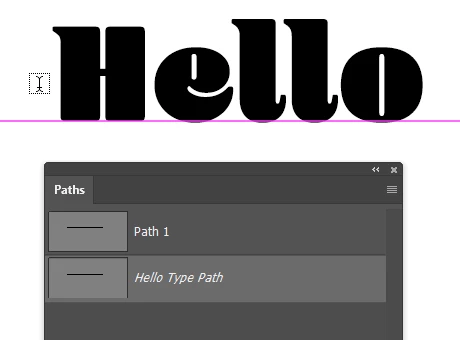
I want to know the font used in this picture.

  • April 7, 2022
  • 5 replies
  • 329 views

I want to know the font used in this picture.


If you hover your cursor over the Photoshop type tool, you will see this information window. What is the font used here? This is Adobe fonts, find the site, but the same font can not be found.

 

This topic has been closed for replies.
Correct answer Trevor.Dennis

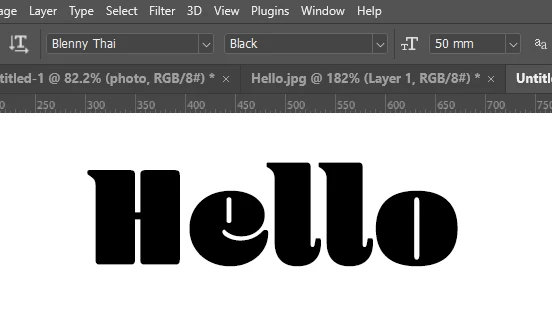
The font is Blenny Thai Black and available from Adobe fonts

The icon on the left is Type on a Path


5 replies

Trevor.Dennis
Community Expert
Trevor.DennisCommunity ExpertCorrect answer
Community Expert
April 8, 2022

The font is Blenny Thai Black and available from Adobe fonts

The icon on the left is Type on a Path


c.pfaffenbichler
Community Expert
Community Expert
April 8, 2022

Could you please post screenshots with the pertinent Panels (Toolbar, Layers, Options Bar, Character, …) visible? 

lambiloon
Community Expert
Community Expert
April 8, 2022

Hi, that is a character panel or character you can check it from windows...regards

Ali Sajjad / Graphic Design Trainer / Freelancer / Adobe Certified Professional
Bojan Živković11378569
Community Expert
Community Expert
April 8, 2022

Have you tried Type > Match Font?


Otherwise what is your actual question? Can you try one more time to explain what exactly you want to ask?

Participant
April 7, 2022

i know this font


[ merged with duplicate post by moderator — please post once ]


c.pfaffenbichler
Community Expert
Community Expert
April 7, 2022

Is there a question? 

If so, please post a proper screenshot instead of a photograph. 

https://www.take-a-screenshot.org