
May 9, 2021
Answered

I wonder why PS decrease photo quality !?

  • May 9, 2021
  • 1 reply
  • 1468 views

Hello,

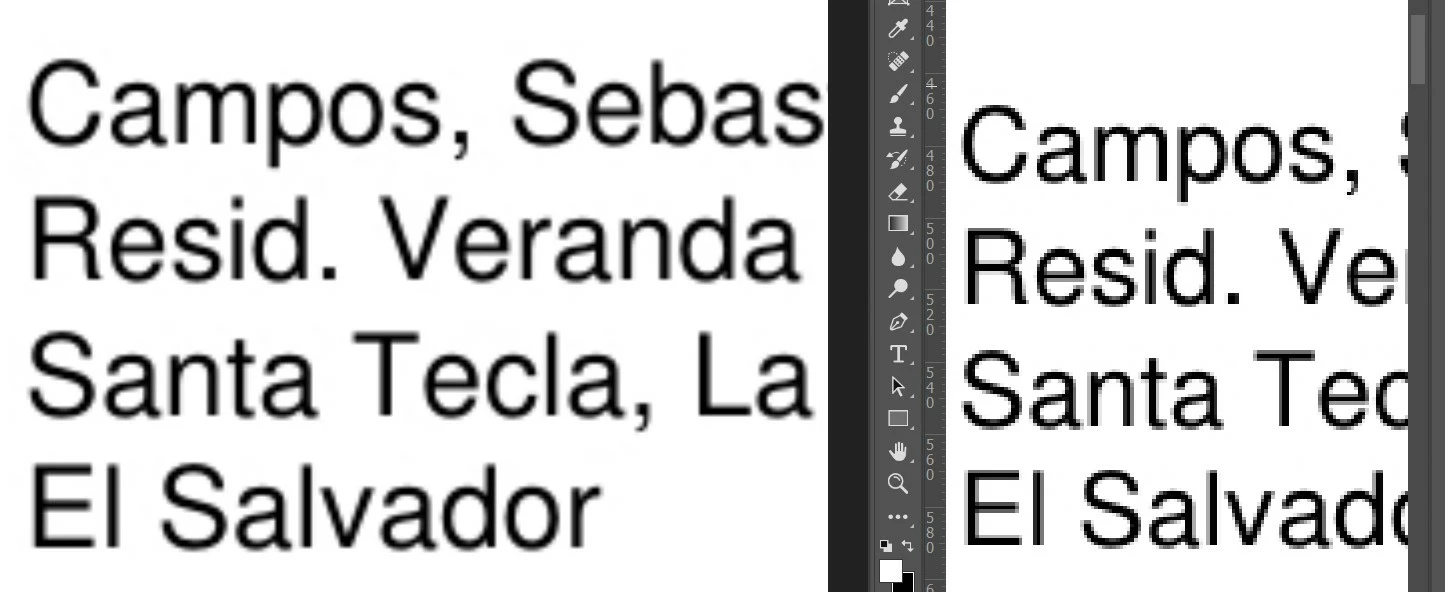
I am sort of new with photoshop. when I place or open files on photoshop, it decreases photo quality obviously and mostly it happens on texts and make it pixelated. left photo is windows photo viewer and the right one is photoshop. I tried enlargement in image size to make it smoother but it doesn't work.

I will be apriciated if anyone can help me 😕😕
This topic has been closed for replies.
Correct answer davescm

If you using the text tool to add new text on a text layer, or to edit an existing text layer in a document, then you can choose sharp/smooth etc from the options bar:


If you have just opened a  document with text in it that is already rasterised then no, aside from selecting the area and blurring the text.


Dave

1 reply

davescm
Community Expert
Community Expert
May 9, 2021

What zoom level. What your screenshot appears to show is that Photo Viewer is softening the edges more when zoomed in more than 100% and Photoshop is just showing the anti-aliasing that will be applied at 100% zoom and not adding additional softening. However, the real test is to view at 100% where 1 image pixel maps to 1 screen pixel.


Dave

May 9, 2021

thank you for your response, is there any option to softening the edges in PS ?

davescm
Community Expert
davescmCommunity ExpertCorrect answer
Community Expert
May 9, 2021

If you using the text tool to add new text on a text layer, or to edit an existing text layer in a document, then you can choose sharp/smooth etc from the options bar:


If you have just opened a  document with text in it that is already rasterised then no, aside from selecting the area and blurring the text.


Dave
