Known Participant
September 6, 2020
Answered

ICC is not job

  • September 6, 2020
  • 3 replies
  • 853 views

After installing the profile, from the official site, the profile is installed in the "printer settings" (Epson 4880 printer), but not set in the "print options". The photo is not printed correctly. The profiles set automatically when you load Photoshop work correctly. Photoshop CC20. respectfully Nur
This topic has been closed for replies.
Correct answer davescm

Hi

I looked at your screenshots again and I do not understand the problem, aside from the cut off Epson dialogue boxes.


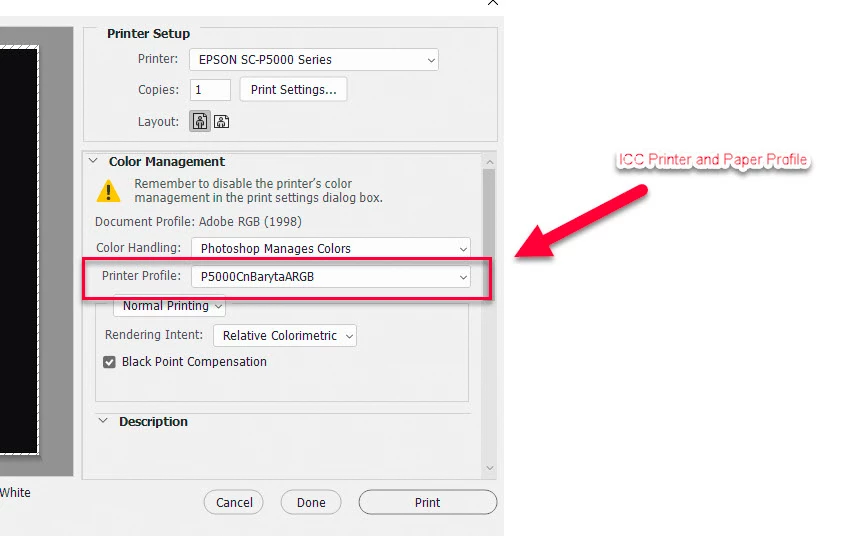
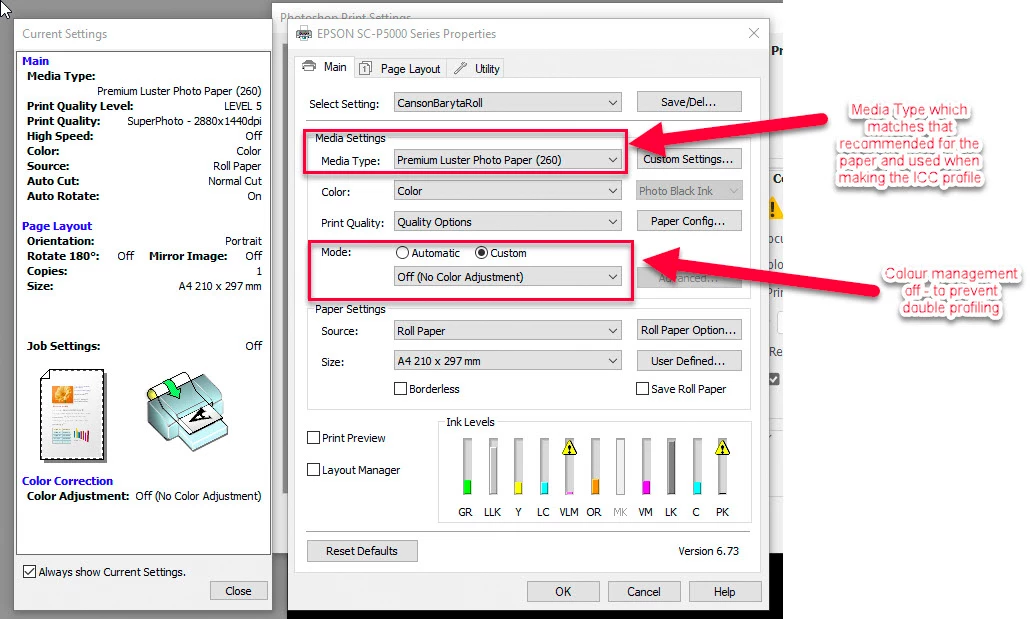
The ICC profile is set in the Photoshop print dialogue along with Photoshop manages colours. The media type (not the ICC profile)  is set in Print settings and color adjustment is set to off. All that looks correct


As an example here are my settings for my Epson P5000 using Canson Baryta paper for which I use my own ICC profiles

and set the Media to Premium Lustre - which is the recommended setting by Canson and the setting I used when I made the profile.


3 replies

davescm
Community Expert
davescmCommunity ExpertCorrect answer
Community Expert
September 13, 2020

Hi

I looked at your screenshots again and I do not understand the problem, aside from the cut off Epson dialogue boxes.


The ICC profile is set in the Photoshop print dialogue along with Photoshop manages colours. The media type (not the ICC profile)  is set in Print settings and color adjustment is set to off. All that looks correct


As an example here are my settings for my Epson P5000 using Canson Baryta paper for which I use my own ICC profiles

and set the Media to Premium Lustre - which is the recommended setting by Canson and the setting I used when I made the profile.


Nur5D95Author
Known Participant
September 14, 2020

Hello. I think I figured out my mistake. I install a new ICC profile and it is in the "printer settings", but there is no such name for the photo paper in the "media type" and Photoshop selects a photo paper that is similar in characteristics. I myself prescribed the name of the photo paper (screenshot 2) and Photoshop turned off the color control functions, the buttons "Automatic" and "Custom" I do not understand the name of the photo paper ... Thank you for your patience and time. Nur

Nur5D95Author
Known Participant
September 14, 2020

Hello. I think I figured out my mistake. I install a new profile and it is in the "printer settings", but there is no such name for the photo paper in the "media type" and Photoshop selects a photo paper that is similar in characteristics. I myself prescribed the name of the photo paper (screenshot 2) and Photoshop turned off the color control functions of the "Automatic" and "Custom" buttons without understanding the name of the photo paper ... Thank you for your patience and time. Nur

josephlavine
Community Expert
Community Expert
September 6, 2020

The first thing to confirm or try is that you have restarted your computer.

warmly/j

Nur5D95Author
Known Participant
September 12, 2020

Thanks for the answer, apparently I didn't explain the problem very well. After updating Photoshop to version CC20, some ISS profiles were not installed. I set them again and they are in the "Printer Profile", but they are not in the list of paper types (in "Print Parameters"). When I record the paper type manually, the color control off button stops working. Everything worked fine in the old version of Photoshop CC19. I reinstalled Photoshop again - the result is the same. Overloading the computer did nothing either. There are screenshots in the app. Regards Nur


davescm
Community Expert
Community Expert
September 12, 2020

The second and third dialogues in your screenshots are not Photoshop dialogues (although they are accessed via Photoshop print settings) . They are Epson dialogues. If the media types are missing from your Epson dialogue, or as in your second screenshot the dialogue is not displaying correctly,  then try re-installing the Epson printer driver.


Dave

D Fosse
Community Expert
Community Expert
September 6, 2020

The profile is set under "Printer Profile", not "Print Settings".


Print Settings opens the printer driver. What you do here is turn off printer color management, and set the correct paper type, which controls total ink. But you do not set the icc profile here.


Nur5D95Author
Known Participant
September 12, 2020

Thanks for the answer, apparently I didn't explain the problem very well. After updating Photoshop to version CC20, some ISS profiles were not installed. I set them again and they are in the "Printer Profile", but they are not in the list of paper types (in "Print Parameters"). When I record the paper type manually, the color control off button stops working. Everything worked fine in the old version of Photoshop CC19. I reinstalled Photoshop again - the result is the same. Overloading the computer did nothing either. There are screenshots in the app. Regards Nur