
Participant
March 12, 2017
Answered

If a layer is marked one particular color then do something...into jsx?

  • March 12, 2017
  • 2 replies
  • 902 views

Im working on a solution for our interactive fellows and art guys to better export photoshop layers' position and size information into code.

I had done everything right expect in canvas for example we need to pin some element's axis center point ( or some word starts with letter o I cant recall ) to some particular angle like left-bottom / top-bottom.

My goal is to let art guy decide which layer's axis center point should be where , without telling our code guy. And I think to mark every layer's color is one easy way to do that : If I want this layer's axis center point to be "left-bottom" in future , I just mark it red; If top-bottom, mark purple; and so on.
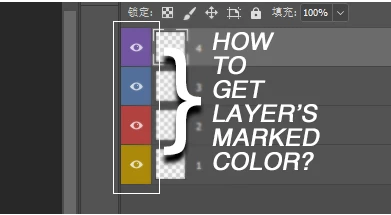
Now comes the part Im having trouble carry on, is there a way to code the export jsx that can get the "mark color" in photosohp ?

Thanks in advance.

This topic has been closed for replies.
Correct answer SuperMerlin

//Colours returned ....

// "none","red","orange","yellowColor","grain","blue","violet","gray"

function getLayerColour(){

var ref = new ActionReference();

    ref.putProperty( charIDToTypeID("Prpr") ,stringIDToTypeID("color"));

   ref.putEnumerated( charIDToTypeID("Lyr "), charIDToTypeID("Ordn"), charIDToTypeID("Trgt") ); 

  return typeIDToStringID(executeActionGet(ref).getEnumerationValue(stringIDToTypeID("color")) );

};

function getLayerColourByIndex( idx ) {

    var ref = new ActionReference();

   ref.putProperty( charIDToTypeID("Prpr") ,stringIDToTypeID("color"));

    ref.putIndex( charIDToTypeID( "Lyr " ), idx );

    return typeIDToStringID(executeActionGet(ref).getEnumerationValue(stringIDToTypeID("color")));

};

2 replies

SuperMerlin
SuperMerlinCorrect answer
Inspiring
March 12, 2017

//Colours returned ....

// "none","red","orange","yellowColor","grain","blue","violet","gray"

function getLayerColour(){

var ref = new ActionReference();

    ref.putProperty( charIDToTypeID("Prpr") ,stringIDToTypeID("color"));

   ref.putEnumerated( charIDToTypeID("Lyr "), charIDToTypeID("Ordn"), charIDToTypeID("Trgt") ); 

  return typeIDToStringID(executeActionGet(ref).getEnumerationValue(stringIDToTypeID("color")) );

};

function getLayerColourByIndex( idx ) {

    var ref = new ActionReference();

   ref.putProperty( charIDToTypeID("Prpr") ,stringIDToTypeID("color"));

    ref.putIndex( charIDToTypeID( "Lyr " ), idx );

    return typeIDToStringID(executeActionGet(ref).getEnumerationValue(stringIDToTypeID("color")));

};

Participant
March 16, 2017

THX Sounds promising I'll try it !

Tomas Sinkunas
Legend
March 12, 2017

Hi Beard.

To get label color, you can use this script:

function getLayerColour(){

  var ref = new ActionReference();

  ref.putEnumerated( charIDToTypeID("Lyr "), charIDToTypeID("Ordn"), charIDToTypeID("Trgt") );

  var appDesc = executeActionGet(ref);

  return typeIDToStringID(appDesc.getEnumerationValue(stringIDToTypeID('color')) );

};

alert(getLayerColour());

This thread talks about layer label colors Determine layer color label from layer id?

Participant
March 16, 2017

Thanks for help Im browsing your topic right now:)