Known Participant
January 23, 2019
Answered

If/Then Action?

  • January 23, 2019
  • 1 reply
  • 479 views

Hello,

Are there options available to create actions that trigger based on conditions?

Let's say I have a bundle of images that have 2-4 paths each depending on the angle & content in the shot.

I can make an action that automates a layout with separate layers masked from each path made in an image.

However, because some images may or may not require certain masks, a droplet/action would break if I dropped 1000 images that varied between 2-4 paths each.

Is there a way I can apply a condition to the action that would skip a sequence if the image did not have the recorded path in the action?

example: Box, Sphere, Cone & Cylinder are 4 different paths that could be created for a batch of images.

Some images may or may not have a Cone or Cylinder path.

In this case, the action would read :

     "if Cone Path missing, then skip; if Cone Path present then play 'Cone Path Layer'"

     "if Cylinder Path missing, then skip; if Cylinder Path present then play 'Cylinder Path Layer'"

Thanks in advance!
This topic has been closed for replies.
Correct answer jane-e

NoobNobods  wrote

Are there options available to create actions that trigger based on conditions?

Hi

To create an IF action:

  • Create a set
  • Create two actions: one if it meets the condition, the other if it does not
  • Create a new action
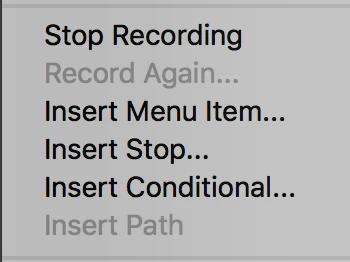
  • From the panel menu, choose Insert Conditional
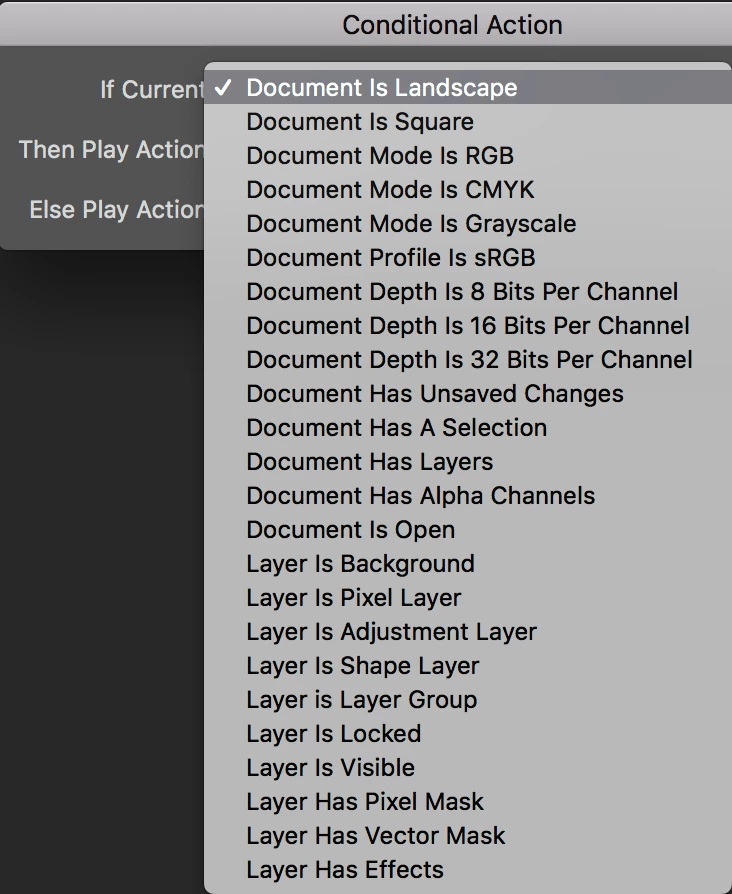
  • Select from these Conditions only (I don't see yours):

  • If it meets the condition, play one action
  • If not, play a different action
  • Stop recording
  • Save set

Jane

1 reply

jane-e
Community Expert
jane-eCommunity ExpertCorrect answer
Community Expert
January 23, 2019

NoobNobods  wrote

Are there options available to create actions that trigger based on conditions?

Hi

To create an IF action:

  • Create a set
  • Create two actions: one if it meets the condition, the other if it does not
  • Create a new action
  • From the panel menu, choose Insert Conditional
  • Select from these Conditions only (I don't see yours):

  • If it meets the condition, play one action
  • If not, play a different action
  • Stop recording
  • Save set

Jane

Known Participant
January 24, 2019

Thank you jane-e for the response!

Seems I'll need to look into adobe script for this one.