Answered
Image editing
Hi friends, after updating photoshop two days back, I am not able to open the file ( images) for editing. The images are not showing up. Instead the workspace starts blinking in white. Please help to solve this problem.

Hi friends, after updating photoshop two days back, I am not able to open the file ( images) for editing. The images are not showing up. Instead the workspace starts blinking in white. Please help to solve this problem.
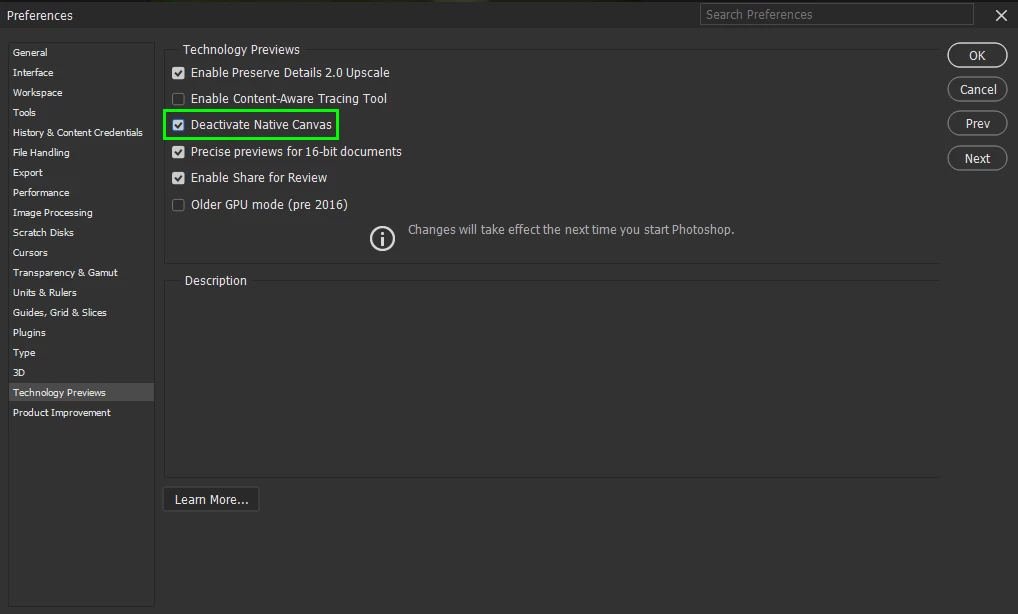
@RAMESH6C12 go to Edit > Preferences > Technology Previews and enable this option, then restart Photoshop
Already have an account? Login
Enter your E-mail address. We'll send you an e-mail with instructions to reset your password.
 AdChoices