Participant
February 23, 2017
Question

Image Pixelation Problem (Photoshop CC 2017.0.1)

  • February 23, 2017
  • 2 replies
  • 2237 views

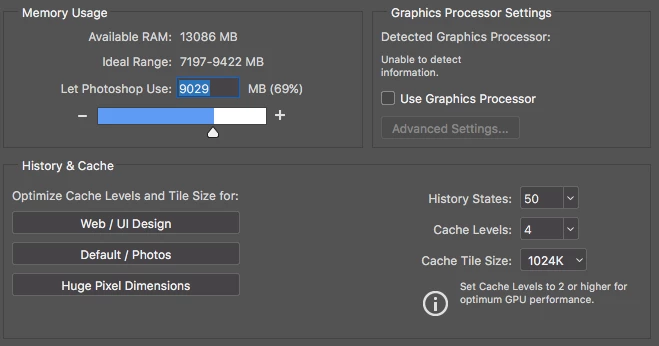
When I updated to the most recent version of PS CC (2017.0.1), I was met with an absolutely God-awful pixelation problem. This issue is present at almost all zoom levels (most prominent at 100% and below). It's most noticeable when working with text but also occurs when working with images. Attached is an example along with machine specs and cache settings. Also, keep in mind that I'm not using the laptop display, I'm using an LG 29" Ultrawide Monitor (29UM57). Any help would be greatly appreciated. Also, side note, bring back scrubby zoom pls&ty.

This topic has been closed for replies.

2 replies

gener7
Community Expert
Community Expert
February 23, 2017

Also since Photoshop is not detecting your card, and you have a 2 graphics card system, go into Apple System Preferences > Power Saver and uncheck Automatic Graphics Switching. Restart Photoshop and see if you can check Use Graphics Processor. It may fix the display problem.

Participant
February 23, 2017

And unfortunately, even after disable GPU switching and enabling the Graphics Processor, nothing changed. It's still doing the exact same thing.

It's really no big deal, I'll just go back to 2015.5 until the next update, hopefully it'll be fixed by then.

gener7
Community Expert
Community Expert
February 23, 2017

I can relate, I keep an earlier version handy for such glitches as well.

Gene

Mohit Goyal
Community Manager
Community Manager
February 23, 2017

Hi travisl,

Have you tried changing the resolution for the text?

Go to Image menu > Image size > Change the resolution to 300 PPI and check if that helps.

Thanks,

Mohit

Participant
February 23, 2017

Even with the PPI switch from 72 to 300, the issue is still persisting. At higher magnifications, it's not as bad and actually will fix itself depending on the zoom level (it's inconsistent, 200% was fine, the 140s-150s still had the issue), but working at lower (about 75% or less) magnifications, it is still very prominent.