
jhaber3
Known Participant
September 16, 2023
Resuelto

Image resize in pixels

  • September 16, 2023
  • 3 respuestas
  • 442 visualizaciones

I just failed to post this, so let me try again if I may. I had today an upgrade in Windows 11, and then I found I'd lost a key option in resizing images. I'd always gone to Resize, Image, and seen the size in pixels with a field for me to enter a new size in pixels, ideal for me working on my Web site rather than for printing. Now I see the size in pixels and below it, a field with dropdown options only for other units such as inches. What happened? Thanks!
Este tema ha sido cerrado para respuestas.
Mejor respuesta de J E L

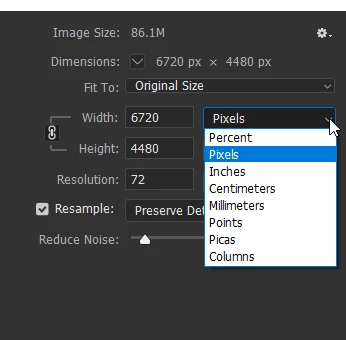
Hi @jhaber3, can you post a screenshot of what you are seeing? Do you mean from within Photoshop, Image > Image Size, you see this dialogue box, but now it's different from mine after your Windows 11 update? The fields are completely gone, so you can't type into them? Note, the Resample box has to be checked to change the fields in Pixels.

3 respuestas

jhaber3
jhaber3Autor
Known Participant
September 16, 2023

Thanks so much. Unless things go wrong tomorrow, I bet you nailed it. When I checked "resample," the fields next to the pixel counts opened up. (The fields below for other units remain, but I can ignore them until I need them, which is great.)

Stephen Marsh
Community Expert
Community Expert
September 16, 2023

As J E L notes: If resample isn't active, one can't resize in the unit of pixels.

J E L
Community Expert
J E LCommunity ExpertRespuesta
Community Expert
September 16, 2023

Hi @jhaber3, can you post a screenshot of what you are seeing? Do you mean from within Photoshop, Image > Image Size, you see this dialogue box, but now it's different from mine after your Windows 11 update? The fields are completely gone, so you can't type into them? Note, the Resample box has to be checked to change the fields in Pixels.