neodigms
Participant
July 23, 2021
Frage

Images appear blurry/pixelated while placing in Photoshop on macOS

  • July 23, 2021
  • 1 Antwort
  • 203 Ansichten

why do high -res photos turn blurry when placed.  this hasn't occurred before.  haven;t changed any settings.
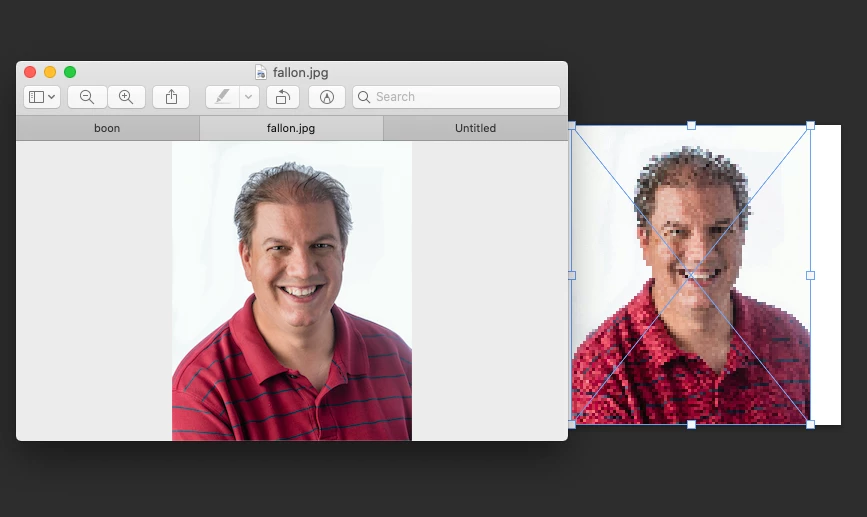


{Thread title edited by moderator}

Dieses Thema wurde für Antworten geschlossen.

1 Antwort

nikunj.m
Legend
July 23, 2021

Hi,


We're sorry about the trouble while placing your images in Photoshop. Would you mind sharing the version of Photoshop you're using along with your computers macOS version? Looking at the screenshot you've shared, it appears that you have not comminted to the location where to place the image on the canvas. Does the images still appear pixelated/blurry when you accept the placement? If not, it might be due to the app not being able to render the image preview in real time while being placed.


You can try disabling the option to Use Graphics Processor from Photoshop by going to Preference, then Performance. Once done, quit & relaunch Photoshop to check if that helps.


You can also try optimizing the Preferences of Photoshop using the steps suggested here: https://helpx.adobe.com/photoshop/kb/optimize-photoshop-cc-performance.html


Let us know if it helps!

Regards,

Nikunj