baldranch
Participant
December 14, 2017
Answered

Images not displaying in Photoshop

  • December 14, 2017
  • 4 replies
  • 12343 views

After updating to Photoshop CC 2018, my images won't display. I can open and edit raw files in Camera Raw, but when I open image to Photoshop I get a blank (black) image. Tried viewing different sizes, but still nothing. Tried viewing raw files that I previously edited in Photoshop, but they won't display either.

I uninstalled and re-installed and that didn't solve the problem.
    This topic has been closed for replies.
    Correct answer

    Hi

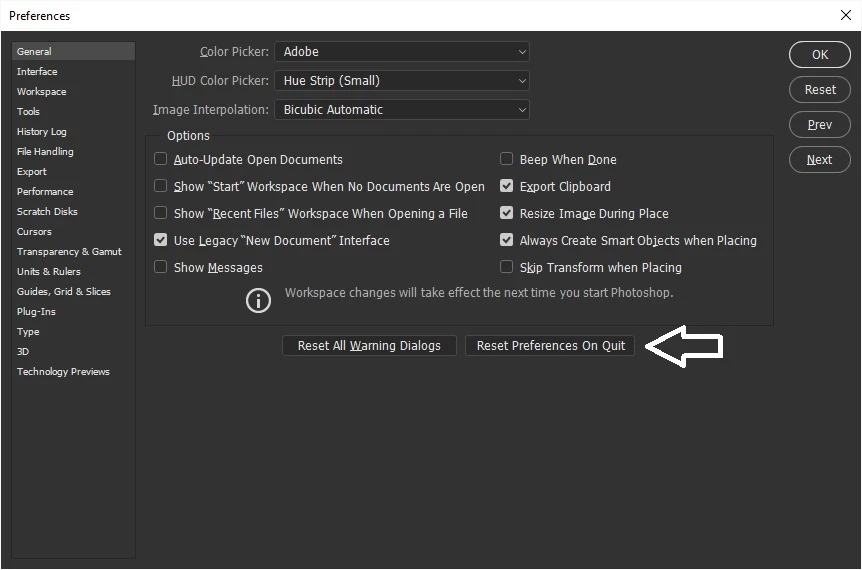
    Try resetting PS preferences

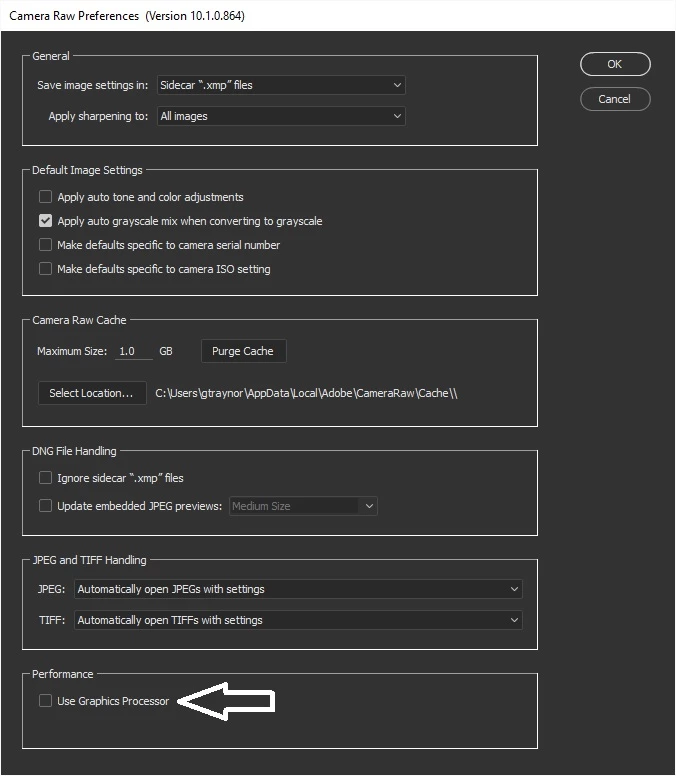
    Also try disabling this

    4 replies

    baldranch
    baldranchAuthor
    Participant
    December 14, 2017

    That works. Disabled graphics processor and that fixed the problem

    Not sure why this is an issue now. Graphics driver is updated and have been using updated versions of Photoshop with same system for 2+ yrs. Never had this problem before.

    Windows 10

    GeForce GTX 970 graphics card

    Trevor.Dennis
    Community Expert
    Community Expert
    December 14, 2017

    This is the third post reporting the same problem.  we need to know your system spec to see if there is correlation between peple having this issue.

    Mylenium
    Legend
    December 14, 2017

    Start by updating your graphics driver and checking the relevant hardware acceleration settings in PS and ACR.

    Mylenium

    Correct answer
    December 14, 2017

    Hi

    Try resetting PS preferences

    Also try disabling this