
Answered
Import video frames to layers not working in Windows 11
Hello,
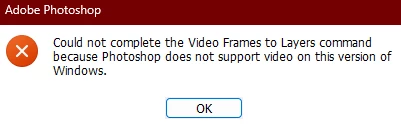
I suddenly have a problem with the Import video frames to layers function in Photoshop. It shows me the following error everytime I try to use it:
Adobe Photoshop Version: 25.9.0 20240516.r.573 296f739 x64
Operating System: Windows 11 64-bit
Version: 11 or greater 10.0.22621.3593
System architecture: Intel CPU Family:6, Model:14, Stepping:4 with MMX, SSE Integer, SSE FP, SSE2, SSE3, SSE4.1, SSE4.2, AVX, HyperThreading
Does anyone have the same problem?
 AdChoices