
Inspiring
January 10, 2022
Question

importing tabs in file order

  • January 10, 2022
  • 1 reply
  • 449 views

I am working though a large number of files which were photographed and were filed in a logical order.
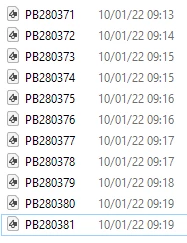
However when I select and open these from the Windows folder, the tabs are placed completely randomly. 

This makes finding the relevant metadata in my records unnecessarily convoluted.

How can I force Photoshop to order the tabs in the same order as the file structure?  e.g. alphanumerically, date/time, Windows listing etc

Thank you

This topic has been closed for replies.

1 reply

Stephen Marsh
Community Expert
Community Expert
January 10, 2022

How are you opening the files from Windows File Explorer?


Select all files, doulble click? Select all files, right click open? Selecta all files, drag onto program shortcut or taskbar icon etc?


Have you tried in Photoshop > File > Open, then click on the name header to sort by name and then open?


Do you have Adobe Bridge?


A script in Photoshop can open all files in a folder (or filtered by extension) and force open in alphabetical or reverse alphabetical sort order, but you shouldn't need to go that far.

Inspiring
January 10, 2022

Thank you for a prompt reply.

In the Windows folder, I select the files as shown in the shot above. Then go to the Ps Open button in Manage/Picture Tools folder view.

This imports the files into Photoshop - in random order.


I have just tried your suggestion - "Photoshop > File > Open, then click on the name header to sort by name and then open" - and that works as I should wish.

Perhaps MS does not like Adobe very much.  From this, I should learn to start with Photoshop.

Adobe Bridge was installed with Photoshop, but I have never used it.


Stephen Marsh
Community Expert
Community Expert
January 10, 2022

Never even seen that button. Photoshop is generally set to open the image formats I work with. So I can just select multiple files and right click > open, or use "open with" and select a different version of Photoshop or another program. One can also press ctrl O to open if the file type is associated to Photoshop. Or drag the images, or use Bridge etc. I'm sure you will find a way that works best for you.