samsonshiu
Participant
January 28, 2019
Answered

In case of mine, how can I change the interface language in Photoshop CC
  • January 28, 2019
  • 1 reply
  • 713 views

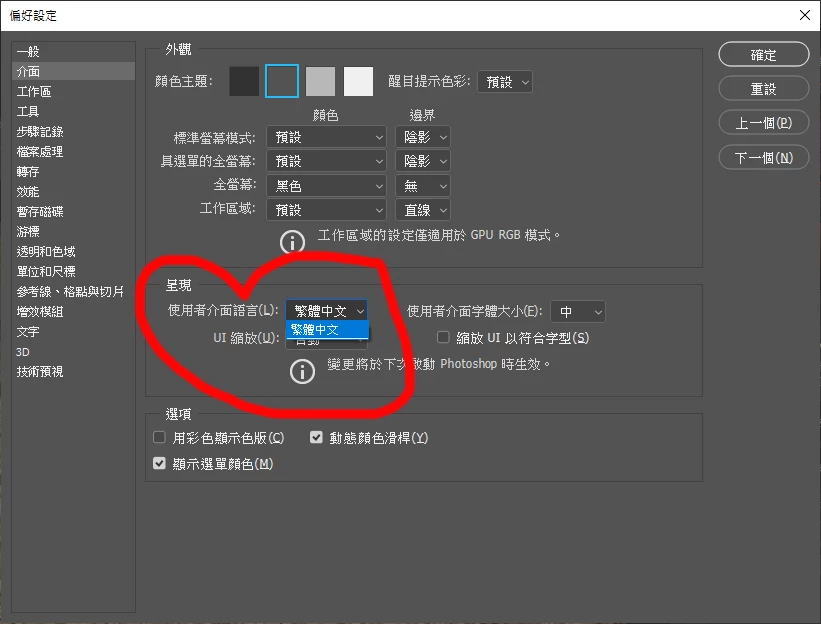
I've installed Photoshop CC recently, but this is in Chinese version.

I've tried to change to the English version, but in Edit> Preferences > Interface > Language, there is no English option.

How can I change to the English interface?

Thank you.

    This topic has been closed for replies.
    Correct answer davescm

    Hi

    Change it in the Creative Cloud app then redownload Photoshop

    See here
    Change the language setting of your Creative Cloud apps

    Dave

    1 reply

    davescm
    Community Expert
    davescmCommunity ExpertCorrect answer
    Community Expert
    January 28, 2019

    Hi

    Change it in the Creative Cloud app then redownload Photoshop

    See here
    Change the language setting of your Creative Cloud apps

    Dave

    samsonshiu
    Participant
    January 28, 2019

    It works. Thank you very much.

    davescm
    Community Expert
    Community Expert
    January 28, 2019

    You're welcome

    Dave