
Participant
September 26, 2020
Answered

In Photoshop the icons are too small

  • September 26, 2020
  • 2 replies
  • 2126 views

I just installed the new Photoshop 2020 but the icons are so small on my 4k screen. Is there anywhere this can be dealt with as I've not found it? The options bar is just way too small to be comfortable to work with.
 

This topic has been closed for replies.
Correct answer

Hi

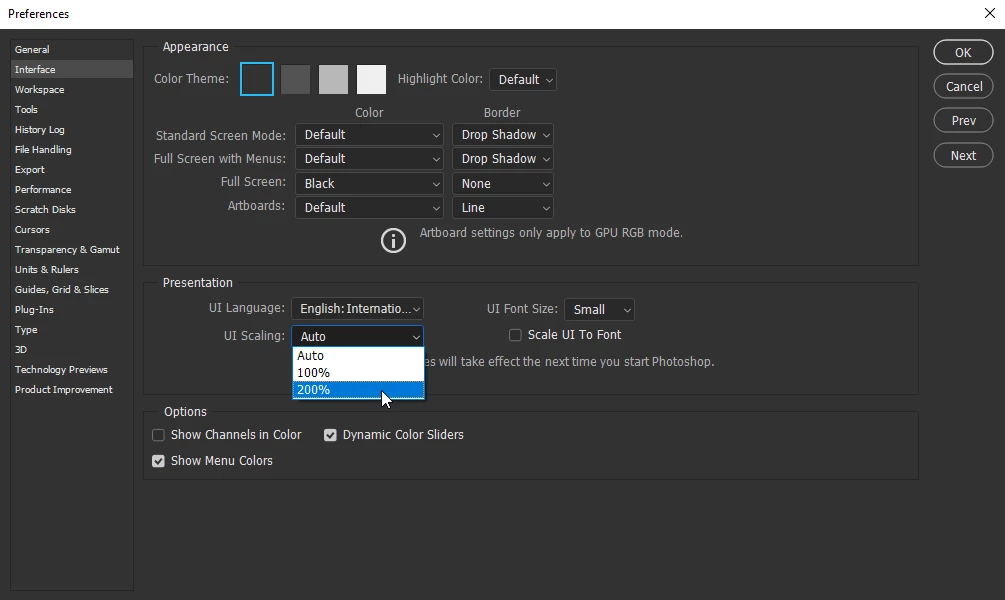
Try adjusting the UI scaling

2 replies

Participant
May 10, 2024

Was forced to go to Photoshop 2024 -- with Win 11 the earlier version kept me having to trash my systrem, lose all my apps, etc.

Now to add insult to injury this is the answer to the microscopic UI in Photoshop 2024??

DO BETTER ADOBE!!!!!

Correct answer
September 26, 2020

Hi

Try adjusting the UI scaling

Participant
September 26, 2020

Thnaks that did seem to help.