jost30015784
Participant
March 13, 2017
Answered

In videography in Photoshop CC 2017 and trying to manipulate the sound of a clip I sometimes get the "no motion" dialog box when right clicking on that clip as you normally get when adding a still to your movie. I don't know how to deal with that pr

  • March 13, 2017
  • 1 reply
  • 257 views

    This topic has been closed for replies.
    Correct answer davescm

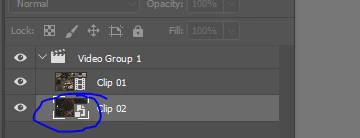
    Whilst Clip 01 is a video clip, Clip 2 is a smart object hence the symbol in the layers panel

    Double click on the icon in the layers panel to open that smart object. It will open as a psb document with its own timeline. Make your adjustments and save the smart object.

    Dave

    1 reply

    davescm
    Community Expert
    davescmCommunity ExpertCorrect answer
    Community Expert
    March 13, 2017

    Whilst Clip 01 is a video clip, Clip 2 is a smart object hence the symbol in the layers panel

    Double click on the icon in the layers panel to open that smart object. It will open as a psb document with its own timeline. Make your adjustments and save the smart object.

    Dave

    jost30015784
    Participant
    March 13, 2017

    Thank you Dave,

    But then i have to start another timeline. I can't "unsmart" this clip in my excisting timeline.

    jost30015784
    Participant
    March 13, 2017

    Dave,

    You were right!

    Just double click on the clip in the layerspanel. It opens a new timeline for this clip. Then right click on this new timeline, make the adjustments and close this clip and save the changes before closing. You automatically return to your original timeline. The clip stays a smart object.

    Thanks so much, Dave.!!