
Participant
May 6, 2024
Question

Inability to scale pattern while using Pattern Stamp Tool

  • May 6, 2024
  • 1 reply
  • 1000 views

The Pattern Stamp tool is great, I love being able to paint with patterns. But I can't seem to find any way to scale the pattern itself, which is preventing it from being useful to me. 


Observe:

The brick texture is too large. I'd like to scale down and "paint in" where I'd like it.
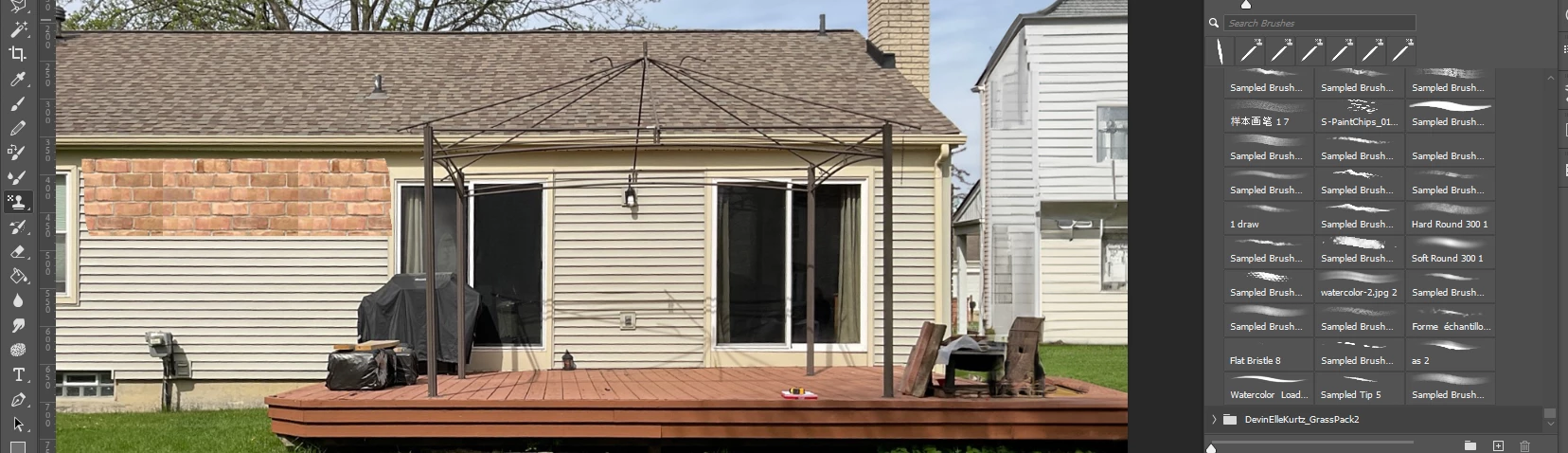


Is there a way to scale the pattern while using the pattern stamp tool?

Please note that I am not referring to the PATTERN FILL tool, or the PATTERN OVERLAY option in "Layer Blending." I am looking for advice specifically related to the pattern stamp tool.


Thanks to anyone who can answer. You're a G

This topic has been closed for replies.

1 reply

Myra Ferguson
Community Expert
Community Expert
May 6, 2024

The Pattern Stamp Tool uses a predefined pattern from the Patterns panel. Although you can change the size of the brush for the Pattern Stamp Tool in the Options bar, that only adjusts the size of how much of the pattern is applied--not the size of the actual pattern.


To scale the pattern, you could apply it to a layer, scale the pattern down, and define a new pattern using that scaled version (Edit > Define Pattern...).


Participant
May 6, 2024

Thank you for the response, Myra - great to have a conclusive answer at last. I hope that Adobe considers adding such a feature to future releases.


Myra Ferguson
Community Expert
Community Expert
May 6, 2024

You're very welcome. 🙂


You could post it as an idea here:
https://community.adobe.com/t5/photoshop-ecosystem/ct-p/ct-photoshop?page=1&sort=latest_replies&filter=all&lang=all&tabid=ideas


There is a similar panel for the Clone Stamp tool which is the Clone Source panel (Window > Clone Source) that does let you adjust the scale of the cloned area.


That being said, that's acutally another approach that you could take--fill a layer with the brick pattern, select the Clone tool, and use the Clone Source panel to scale it down however much you like.