Known Participant
December 19, 2023
Answered

Incompréhension concernant les résolutions d'image

  • December 19, 2023
  • 2 replies
  • 409 views

Bonjour,

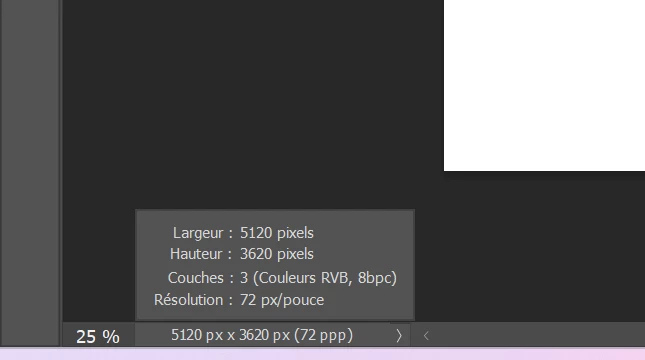
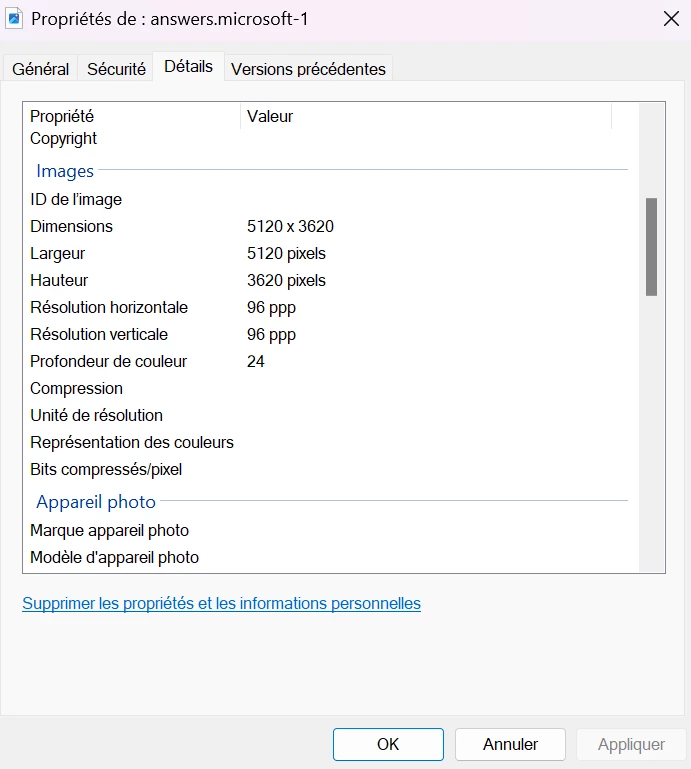
Il y a quelque chose que je ne comprends concernant la résolution d’une image.
Pourquoi est-ce que, entre la boîte de dialogue Propriétés de Windows et Photoshop, les résolutions d’une même image ne sont pas les mêmes ?

Dans les deux cas, l’unité est bien en pixel par pouce, non ?

En vous remerciant par avance pour votre aide


This topic has been closed for replies.
Correct answer Kevin Stohlmeyer

@tchypa note your Photoshop screen resolution (Résolution d'écran) is set to 72. You can adjust this to 96 if you wish.

2 replies

Per Berntsen
Community Expert
Community Expert
December 19, 2023
quote

There's something I don't understand about the resolution of an image.
Why are the resolutions of the same image not the same between the Windows Properties dialog box and Photoshop?

In both cases, the unit is well in pixels per inch, right ?

Thank you in advance for your help


By @tchypa


PPI (pixels per inch) is optional metadata used by printer drivers to calculate the physical dimensions of a printed image.

It is the number of image pixels used to print one inch of the image.

Pixel dimensions divided by PPI value = Printed dimensions in inches.


PPI is not required for screen viewing, so when exporting an image from Photoshop, the PPI value is stripped out.

If you now open the exported image in Photoshop, it will be assigned a PPI value of 72. This happens because Photoshop needs a PPI value for other reasons. (displaying rulers with physical dimensions and displaying type correctly) This number could be anything, but happens to be 72 in Photoshop. 

Windows will assign a PPI value of 96 if there is no PPI value in the image.

So the image you are examining in the File Explorer has most likely been exported, with no PPI value.


PPI is often referred to as "resolution", which is misleading, except for printing.

The real resolution of a digital image is the pixel dimensions.

tchypaAuthor
Known Participant
December 29, 2023

Merci pour vos réponses, je me repenche sur le sujet dans les semaines à venir puis je reviens vers vous

Kevin Stohlmeyer
Community Expert
Community Expert
December 19, 2023

@tchypa go to your Photoshop Settings/Units and Rulers and check your default screen resolution settings.

tchypaAuthor
Known Participant
December 19, 2023

J'ai ceci :


Kevin Stohlmeyer
Community Expert
Kevin StohlmeyerCommunity ExpertCorrect answer
Community Expert
December 19, 2023

@tchypa note your Photoshop screen resolution (Résolution d'écran) is set to 72. You can adjust this to 96 if you wish.