

ja art22
Participant
March 12, 2020
Answered

index color table not working properly with new update v. 21.1

  • March 12, 2020
  • 2 replies
  • 1707 views

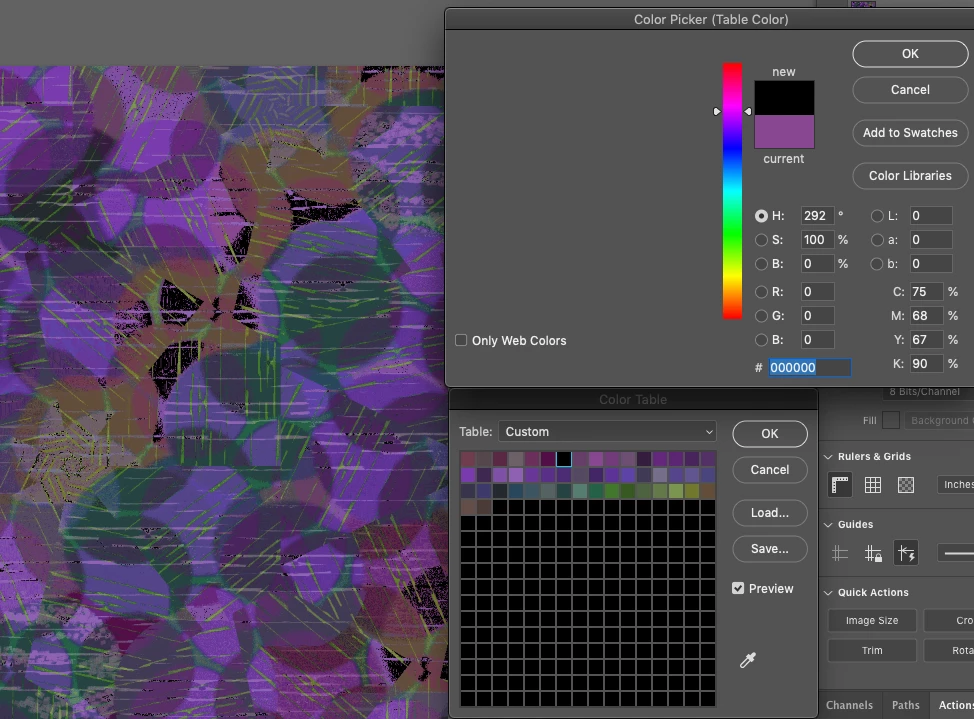
After the new update to PS v. 2.1, the color picker does not work correctly inside the index color table dialog box.

The image below shows when I clicked on a pink color to make it lighter, it turned to black,

and the color in the preview went greyed out/blank.

But when I clicked directly on the image iteslf to change the color, it worked properly.

It only turns to black if I pick a color within the color picker window. 

I hope I explained it clearly enough. Has anyone had this problem? It didn't do this before the update!
    This topic has been closed for replies.
    Correct answer ja art22

    I just updated Photoshop to 21.1.2  and it works like it should! I just tested 2 files and the color table works perfectly!

    2 replies

    Participant
    May 27, 2020

    I have had the same problem, after update it went away but theer is new problem now.When you try adjust  adjust color from color table it jumps around going to opposite of color wheel , meaning trying to adjust blue to be lest bright it jumps to the orange.Supper annoying.

    Participant
    March 13, 2020

    I am having a similar problem.  My screen doesn't go gray like that but when i choose a color it usually goes straight to black instead of whatever I picked.

    ja art22
    ja art22AuthorCorrect answer
    Participant
    April 16, 2020

    I just updated Photoshop to 21.1.2  and it works like it should! I just tested 2 files and the color table works perfectly!