
Interface Issue - phantom window? Photoshop 20.0.5 macOS Mojave 10.14.5
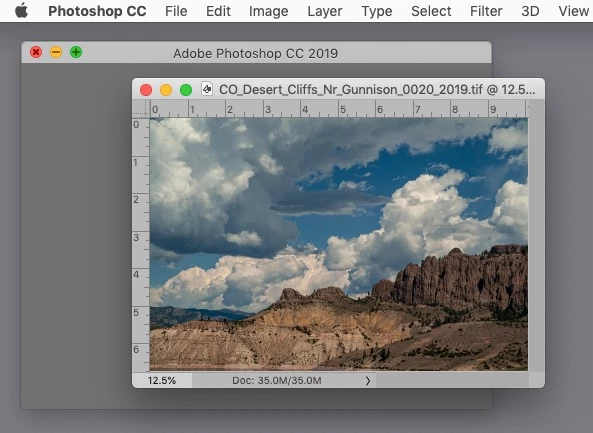
I have an odd panel that seems to be part of the PS interface. I suspect I may have corrupted prefs, but want to check for known issues before resetting prefs. There is a persistent blank grey window BEHIND the working file image window. (see screenshots) I can resize this grey window, but if I close it, the current file closes also. When I reopen my working file, the blank window reappears. It's like an image window without an image. I have reviewed the workspace/interface prefs & don't see anything that removes this panel.
So is this a known issue, corrupted prefs, or just an odd new feature that I'm not getting?
Thanks
Grey panel is at left. Working file to the right. PS: 20.0.5 Mac OS: 10.14.5 - Mac Pro (cylinder style)
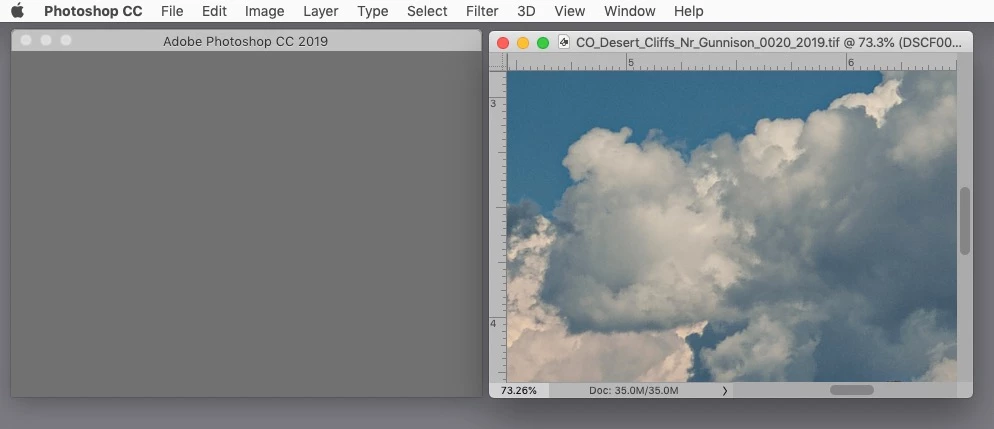
In this screenshot the upper left control buttons are active in BOTH panels.
Message was edited by: Sahil Chawla
 AdChoices