Participant
August 31, 2021
Answered

Is it possible to generate image assets from files saved in the cloud?

  • August 31, 2021
  • 2 replies
  • 974 views

Is it possible to generate image assets from files stored in the cloud?


I can select the menu below.
[Image Asset> Generate]
I don't know where it was saved even if there is a check mark.


Currently, I save it to my desktop and then generate it, which is very annoying.

Please let me know.


Thank you.
    This topic has been closed for replies.
    Correct answer jeannal9487282

    @jeannal9487282 wrote:

    Wow! I never would have found that location.


    That is the beauty of search programs to help find files that are not initially obvious.


    @jeannal9487282 wrote:

    Seems they need a method for the user to define where that folder goes.


    That may or may not be possible, however, Adobe should at least update the help page to include information regarding generating assets from cloud docs:

    https://helpx.adobe.com/au/photoshop/using/generate-assets-layers.html

    "Photoshop generates the image assets and saves them in a subfolder alongside the source PSD file. If the source PSD file is not saved yet, Photoshop saves the generated assets in a new folder on your Desktop." 


    EDIT: The cloud doc location is mentioned on the following webpage, just not on the Adobe website where it would get more notice:

    https://github.com/adobe-photoshop/generator-assets/wiki/Generate-Image-Assets-Functional-Spec#where-does-the-output-go


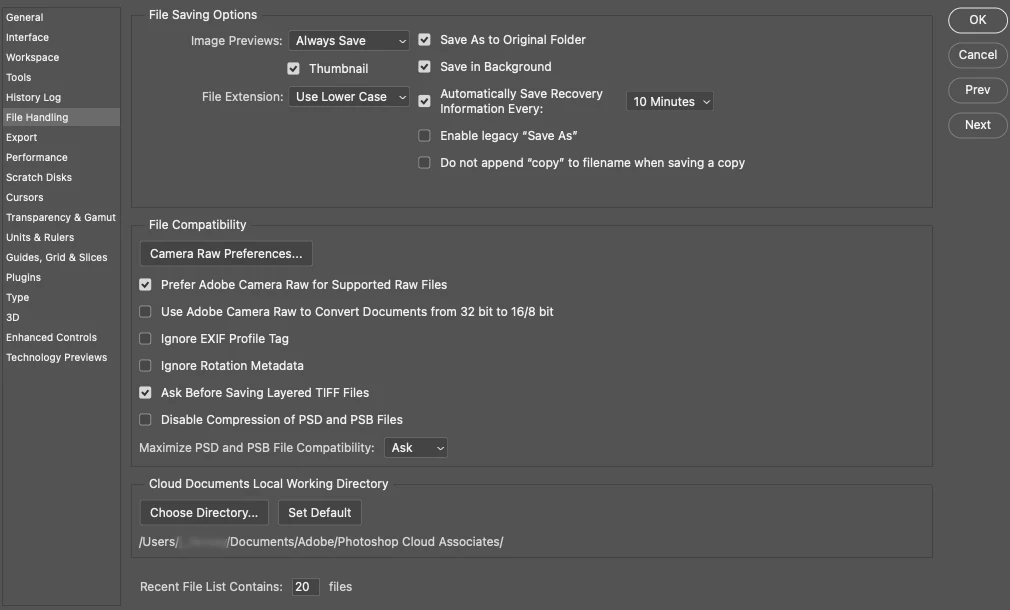
    After talking to a coworker about this, we realized you can also specify a folder through Preferences in the File Handling section under Cloud Documents Local Working Directory.


    2 replies

    Legend
    September 1, 2021

    Hi @KOI-CHA Which application are you using? Do you have a screen shot of where the menu item you're referencing is from?

    KOI-CHAAuthor
    Participant
    September 6, 2021

    Hi, Jeffrey.
    thank you for your reply.


    I'm using Photoshop CC 2021.
    I took a screenshot so can you see it?


    It's very troublesome to save the file to the desktop one by one and then generate it from the "Image Asset" menu, so I'd be happy if there was any solution.


    If the "Image Assets" menu works fine even when saved in the cloud, please tell me where it will be saved!


    Thank you.

    kglad
    Community Expert
    Community Expert
    September 1, 2021

    <moved from cc services>