
Inspiring
May 7, 2022
Question

Is it possible to print a grayscale image with a Gamma closer to 1.0?

  • May 7, 2022
  • 3 replies
  • 2596 views

I print digital negatives from Photoshop. A digital negative is a grayscale image printed on clear film that is used for contact printing in the darkroom. The document profile is Adobe RGB, but the components R, G, and B are all equal.


I allow the printer (an Epson P700) to manage color. When I choose a Media Type in the print dialog, I choose one of the photo papers, since there is no such media type as "clear film." Since Photoshop thinks it is printing on paper, it lays down ink in such a way that the print, will match the image on my screen when viewed by a human observer in reflected light, which is to say it applies some kind of gamma correction. As a result, print density increase rapidly as tone approach RGB=0 (K-100%). In the following plot, the X axis is digital grayscale tone and the Y axis is log density.
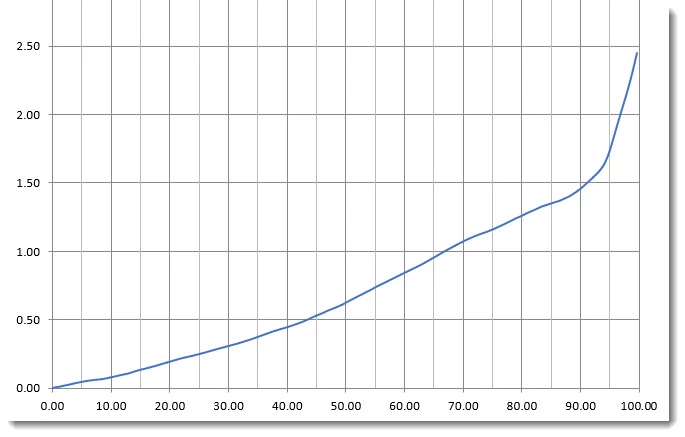
For digital negatives, these rapidly increasing densities near RGB=0 are a problem. A more linear curve would be desirable. Is there is anything I can do to make the curve more linear?  A gamma correction of 1.0 would be ideal, since it would produce a negative with linear tones.  Or perhaps the solution is to let  Photosop manage color and use some kind of output ICC profile that would straighten the curve. If so, can you suggest how to either find or make such a profile?

This topic has been closed for replies.

3 replies

Mylenium
Legend
May 8, 2022

I could swear back in the day there were settings for Epson transparent overhead projector foils... Anyway, I don't think you can resolve this elegantly. Even if the Gamma were linear it would not behave like film (which isn't perfectly linear either, anyway) simply because the printer would still manipulate the amount and placement of ink. That being the case your best bet likely is creating a a custom set of adjustments in PS and baking them into a profile/ LUT ore reusable preset.


Mylenium

J IsnerAuthor
Inspiring
May 8, 2022

The "printer" is a component of a model of tone reproduction that I'm using to simulate alternative process printing. The printer's job is to transform digital tones to transmission densities. Transmission densities control exposure. The model works mathematically as long as transmission densities increase monotonically from K=0% to K=100%, so any continuously upward-sloping curve will work, at least in theory. However in practice, if you consider error propagation, portions of the curve with very steep or very shallow slope do not sort out the corresponding tones very well. A linear curve is ideal for error propagation.


A solution found in other digital negative calibration methods is to add color to the negative using an adjustment layer or LUT (e.g., a Color Fill layer in Overlay mode). Here is an example comparing a grayscale negative with one that has been colorized with a certain shade of red:


As you can see, colorizing has exactly the effect on the negative that I'm looking for. However I cannot use such adjustments to the photoshop image because my model assumes a single gray channel, and these adjustments involve multiple channels. I have experimented with applying tints in the printer driver, but they have minimal effect compared with a color adjustment layer. 

TheDigitalDog
Inspiring
May 8, 2022

You asked if anything can be done, the answer was provided and involved an ICC output profile for the intended media and conditions. Which really has nothing to do with Photoshop, or exclusive of Photoshop. 

Author “Color Management for Photographers" & "Photoshop CC Color Management/pluralsight"
TheDigitalDog
Inspiring
May 7, 2022

You need an ICC profile for the specific kind of output and you need a media setting for this as well (media first, then profile built upon that media). The gamma of the Working Space is moot; it gets converted to the output profile color space and TRC. Yes, Photoshop needs to managed color, meaning you need an output profile. 

Author “Color Management for Photographers" & "Photoshop CC Color Management/pluralsight"
J IsnerAuthor
Inspiring
May 7, 2022

There is no Media type or ICC profile for clear film, and I have yet to hear of anyone who has made one, at least not for pedestrian photographic applications. I'm happy with the printer thinking it's printing on some kind of paper surface. I simply want less of a "hockey stick" effect in the deep shadows (something like below).  I don't need to control the output any more than that.


TheDigitalDog
Inspiring
May 8, 2022

There is always some media setting associated with some ICC printer profile. You can't profile without specifying one to print the targets to measure for a profile. If one doesn't exist for a specific media, you have to find one that produces the best output behavior, then use that and build the profile. It is why test documents like this exist (for profile customers):

Download this test file for visually examining ink density. Used to test best media settings for 3rd party papers:
http://digitaldog.net/files/InkDensity.zip

The media settings and other driver settings can be used to control, to some degree, the ink delivery. After which, a profile profiles that behavior. That is how one profiles clear film.  

Author “Color Management for Photographers" & "Photoshop CC Color Management/pluralsight"
Lukas Engqvist
Community Expert
Community Expert
May 7, 2022

The problem is how your printer lays ink. It should be possible to make an ICC profile, but it is hard for you to control the density when it is the printer that is managing the colours. Ther Printer is not printing in RGB, but converting from RGB to the printers inks, this process is controlled by the printer.

I am also a little confused since you say you are doing greyscale and then you talk about RGB. You are not using true greyscale? You can set output device curves in photoshop, but not if the device is managing colours. You can make both custom dotgain and custom gama curves in your colour settings.

J IsnerAuthor
Inspiring
May 7, 2022

Sorry for the confusion. My document profiles could easily be Gray Gamma 2.2. Then there would be a single gray channel. My images are Adobe RGB, so they have three channels, but R = G = B for every value from 0 to 255 so they're effectively grayscale. Since many of my documents start out as color images before conversion to B&W, I keep them in RGB mode to preserve color information.


It does seem that Photoshop should be managing color. Then I would need to specify an output (a.k.a. printer) profile. Correct me if I'm wrong, but I assume that working profiles like custom gamma and custom dot gain cannot be used as output profiles.


It should be obvious that I'm a complete novice when it comes to color management.