Participant
November 30, 2018
Question

Is my plug-ins "generator hostname:" hacked or can I change it?

  • November 30, 2018
  • 2 replies
  • 481 views

I have recently upgraded machines at my work. Our company has also recently had some sort of hack. Literally on my older machine I saw the name change on one of my camera sd cards and partition. It is a mac. Ok, now on to the question...  look at the preferences for plug-ins on the screen shot below...
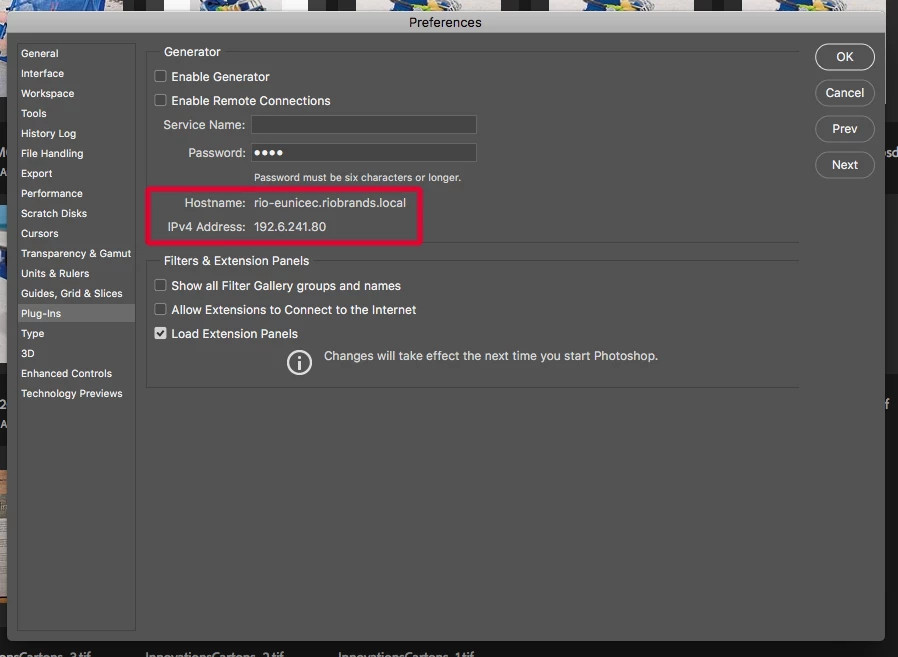
the hostname address is not my computer, it is a different machine, someone else's pc. It was affected by malware/trojan where their passwords were compromised.

I am looking to see how I can change this and correct it. I am also trying to understand how this could even be set up like it is without manually doing it.

So question 1: Can I fix the address without going through a reloading process?

Question 2: Is this a gateway that could affect my machine or network at my company?

Thanks.

This topic has been closed for replies.

2 replies

Participant
December 3, 2018

Thank you for the reply, but not really what i was looking for. Maybe asking again will help -

Can I reassign the hostname address without re-installling photoshop?

I have been unable to find a way to do this at the moment.

Is this something that Adobe photoshop programmer's should know about?

(third party access to the application and altering addresses? If that is what happened)

I am concerned partially because this is a cross platform thing (I work on Mac, my coworker whose address is shown works on PC)

JJMack
Community Expert
Community Expert
December 3, 2018

Did you try changing the network name of your machine.  As far as I know that the machine name and its IP address not a Photoshop setting. Photoshop must get the machine name and IP from your OS configuration. 

JJMack
JJMack
Community Expert
Community Expert
November 30, 2018

That should be you local machine name and you home network local ip 192.xxx.xxx.xxx

JJMack