Participating Frequently
December 19, 2016
Answered

Is there a bug in PS 2017?

  • December 19, 2016
  • 4 replies
  • 846 views

Select> Color Range is grayed out.  I tried to reset the Mode from 32 bit to both 8 and 16 bit but when I do that, up comes Camera Raw instead  with no change in bit level.  I reset the possibly hidden tools, made sure I was in Essentials workspace, whatever suggestions I could find in the Help pages.  No good.  Am I encountering a program bug or corruption and if so How to normalize the program?
Am I encoute

    This topic has been closed for replies.
    Correct answer davescm

    Hi Melvin

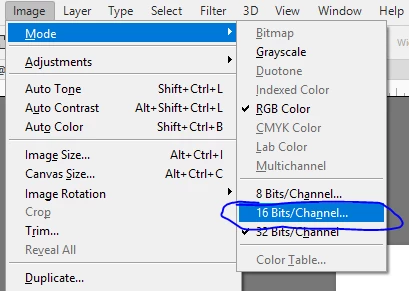
    I have shown the steps I use below - try exactly this and see if it works for you to convert to 16 bit

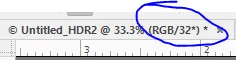
    1. Start with a 32 bit image (the tab at the top of the image will show RGB/32) :

    2. Go to menu Image  - Mode - 16 bits/channel and check it

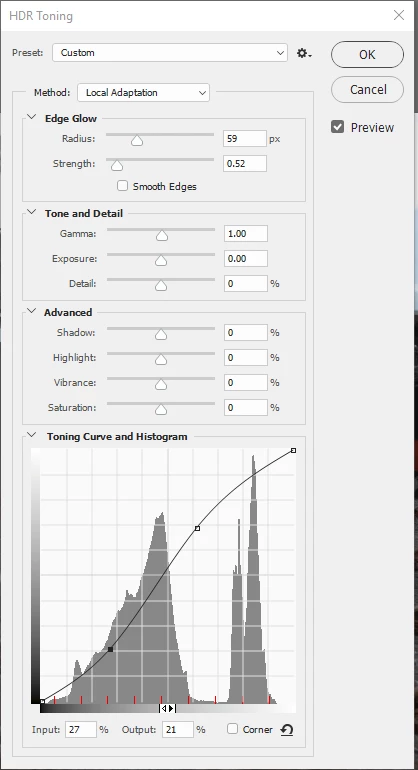
    3. The HDR toning dialogue will open. Adjust your HDR toning curve as required

    4. Press OK at the top of the HDR toning dialogue

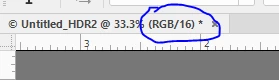
    5. Your image is now in 16 bit (see the RGB/16 in the tab)

    The filters and adjustment layers that were grayed out in 32 bit will now be available

    You will of course need to save the image as a 16 bit PSD/TIFF as required

    Dave

    4 replies

    davescm
    Community Expert
    Community Expert
    December 20, 2016

    You say you are in 32 bit mode - that is why Select -  Color range is grayed out.

    The reason for camera raw opening when you try and convert from 32 bit to 16 /8 bit is that in Preferences - File Handling - File Compatibility you will have this checked :

    Uncheck it and you will get an HDR toning dialogue instead to do the conversion back to 16 bit.

    Dave

    JJMack
    Community Expert
    Community Expert
    December 20, 2016

    Good catch I do not do HDR work so have never used 32bit color depth so I have always ignored that Preference setting that does explain ACR opening up.

    JJMack
    PECourtejoie
    Community Expert
    Community Expert
    December 20, 2016

    Hello, what is the color mode of the image?

    melvinb87Author
    Participating Frequently
    December 22, 2016

    sRGB. (Linear sRGB profile)

    JJMack
    Community Expert
    Community Expert
    December 19, 2016

    There are valid reasons the Select Color Range may be grayed out.  There can be conditions where Color Range is not grayed out but you can not select pixels for one reason or an other.  However, using Select Color Range should not open ACR. Even a smart Object layer that has a RAW file embedded object. You should Post better information OS version Photoshop version screen captures etc.

    JJMack
    melvinb87Author
    Participating Frequently
    December 22, 2016

    You misread my mssg. It was my attempting to change the 32 bit setting to 16 or 8 that opened ACR instead of HDR Toning. I have corrected that part and now open HDR Toning as it should.

    But I don’t change the bit mode—still 32—and so still cannot access Color Range.

    I am using the latest 2017 Photoshop CC on a PC using Windows 10, Microsoft automatically updates the OS so I assume it, too, is up to date.

    I hope this info helps you to help me.

    gener7
    Community Expert
    Community Expert
    December 19, 2016

    Try a Preferences Reset. Reboot your PC as well.

    melvinb87Author
    Participating Frequently
    December 22, 2016

    Good suggestion. I now get HDR Toning as I should, but no change in 32 bit setting so Color Range is still unavailable.

    PECourtejoie
    Community Expert
    Community Expert
    December 22, 2016

    Hello, if I understand correctly, you would like to use color range on a 32 bits image?
    Then you should explain why it is needed in your 32 bits workflow (Are you editing HDR images, or just editing in 32 bits because you think it'll help?) and post a suggestion on http://feedback.photoshop.com