
Terri Stevens
Legend
June 3, 2018
Question

Is there a problem with uploading images here today?

  • June 3, 2018
  • 2 replies
  • 817 views

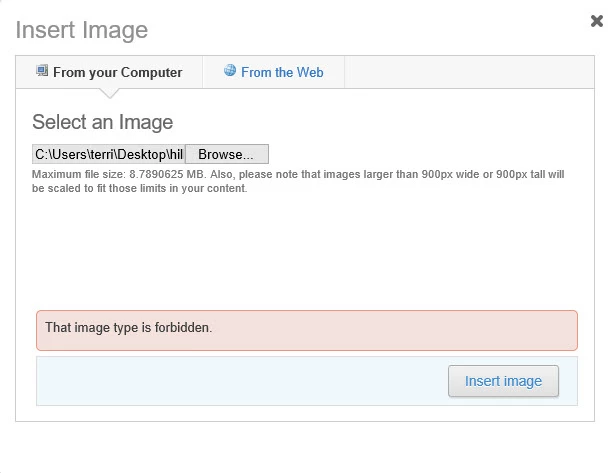
Is anybody else getting this error message when trying to upload to the forum? This happens with any browser and any png or jpg file-even those previously uploaded. It only happens when using the image upload mechanism and as can be seen below works when copying and pasting directly into a question or discussion dialog box.
    This topic has been closed for replies.

    2 replies

    Terri Stevens
    Legend
    June 3, 2018

    Hi guys,

    thanks for your help. I tracked down the cause of the problem to a banner ad blocker in Kaspersky Internet Security Suite. They released a major update last week to handle the new European laws on privacy and in doing so seem to have disabled the widget. You can build an exclusion list but it doesn't seem to work here. Anyhow turned of the ad blocker and now all is fine.

    Terri

    June 3, 2018

    Hey Terri

    I don't have Kaspersky on my work PC and that's where I had the issue, have it installed on my home PC but don't use the ad blocker feature as I have ublock origin installed for Firefox

    June 3, 2018

    Hey Terri I was having the same issue on Friday but thought it was just a once off

    Terri Stevens
    Legend
    June 3, 2018

    Thanks Ged. I've seen it in the past as well but it generally clears. It's not really a problem when you can copy and paste , but I'm just wondering if it is just me or a more universal issue.

    Trevor.Dennis
    Community Expert
    Community Expert
    June 3, 2018

    Terri the only time I use the forum upload widget, is for GIF frame animations.  Most times I just paste directly from the clipboard, or from Greenshot (same thing really).

    The only times I get issues is when I start a post and get waylaid, and try and continue the post at least 15 minutes later.  That's when the red warning bar comes up with (a) Auto save was unable to save your content, or (b) you are unable to post this at this time.  Copying the post to clipboard, hard refreshing the thread with Ctrl F5, and trying again, always fixes this problem.  It usually offers to recover the old post, but only up to the point before I started getting the red warning bar, so it is missing any additional input.  That's why I copy the whole thing to clipboard and paste back to the thread.

    Jane has had some problems recently, but I am not sure of the exact nature.  Hmmm... this sentence reads as a straight line, and I know I should reword it, but I can't bring myself to deny whatever wag wants to make use of it .