
ianb10704575
Participant
June 23, 2018
Answered

Is there a "Update Workspace" option?

  • June 23, 2018
  • 1 reply
  • 2239 views

I recently upgraded PS from CC2017 to CC2018, and lost all my workspaces. (I thought the saved PSW in CC Files would actually be useful for something...oops.)

Anyway, I'm recreating my workspaces, and keep needing to update them, because I keep forgetting little things like shortcuts and window prefs.

There are only options to Reset, Create New, and Delete workspaces. Is there an Update Workspace option hidden somewhere, so I don't need to keep typing the name of the workspace in over and over again?
This topic has been closed for replies.
Correct answer JJMack

Make the changes you want and save a new workspace.  When naming the new workspace use your old workspace name.  You will get a prompt asking if you want the replace the existing workspace with the name.

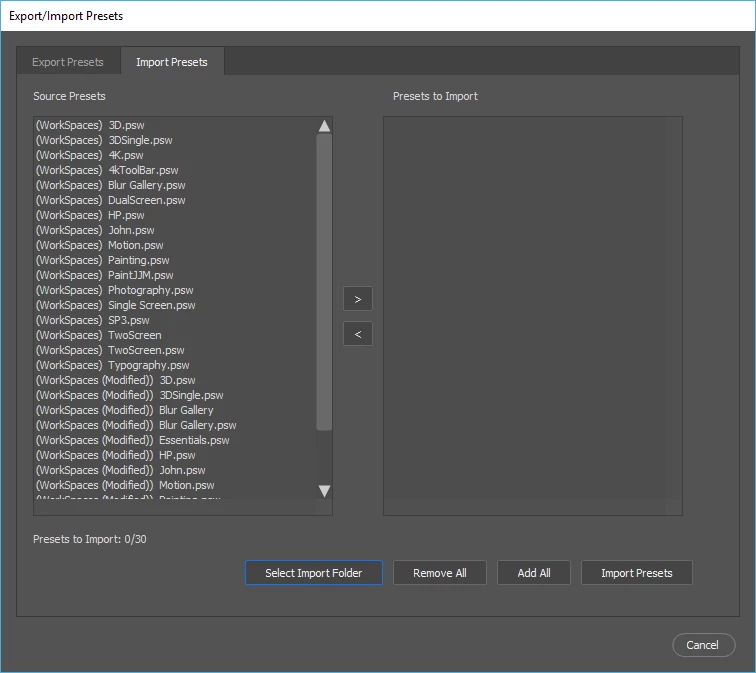
You can also import preset like workspaces from prior versions of Photoshop.

1 reply

JJMack
Community Expert
JJMackCommunity ExpertCorrect answer
Community Expert
June 24, 2018

Make the changes you want and save a new workspace.  When naming the new workspace use your old workspace name.  You will get a prompt asking if you want the replace the existing workspace with the name.

You can also import preset like workspaces from prior versions of Photoshop.

JJMack