Xosphoros
Participant
September 4, 2018
Answered

Is there a way to change brush presets to tool presets?

  • September 4, 2018
  • 1 reply
  • 2100 views

I accidentally imported some tool presets as brush presets and now I can't change them back to tool presets. Even when I delete them and re-import them they just get imported as brush presets. I don't get the pop-up for choosing if I want it to be a brush preset or not.

    This topic has been closed for replies.
    Correct answer Xosphoros

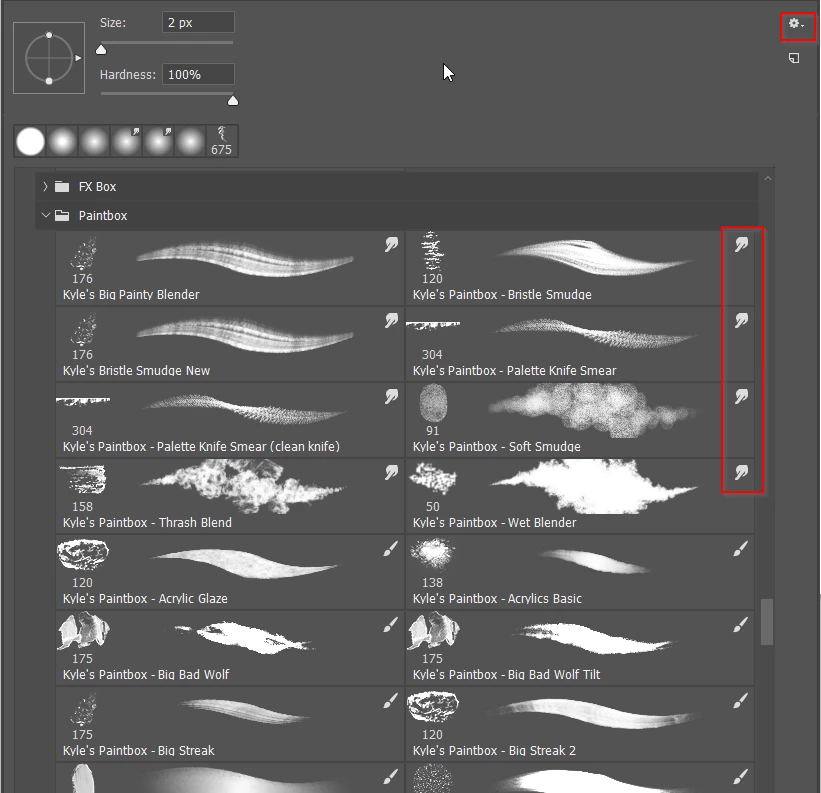
    The current version of Photoshop  CC 2018 is able to save tool presets along with brush presets.  You access and use the tool presets directly from the right click brush menu.  If you enable  the view options  byt clicking on the little cog icon, you can see what tool each preset will switch to.  I'm guessing that your tool presets will be there, but I couldn't say more without knowing how  and what you installed?

    I just watched this video: Tool Presets & How to Use Them - YouTube

    and, although I have to change each one individually, I don't have many tool presets to convert so this has fixed my problem.

    I'm sorry that I may have wasted some of your time, but thank you for taking that time to try to answer my question!

    1 reply

    Trevor.Dennis
    Community Expert
    Community Expert
    September 4, 2018

    What Photoshop version?

    Xosphoros
    XosphorosAuthor
    Participant
    September 4, 2018

    I'm currently using the free trial version of photoshop CC.

    Trevor.Dennis
    Community Expert
    Community Expert
    September 4, 2018

    The current version of Photoshop  CC 2018 is able to save tool presets along with brush presets.  You access and use the tool presets directly from the right click brush menu.  If you enable  the view options  byt clicking on the little cog icon, you can see what tool each preset will switch to.  I'm guessing that your tool presets will be there, but I couldn't say more without knowing how  and what you installed?