Known Participant
January 27, 2019
Answered

Is there a way to lock the Airbrush-style build-up effect?

  • January 27, 2019
  • 2 replies
  • 1136 views

I have a ton of brushes. Is there a way to lock the "Airbrush-style build-up effect" so that the brushes don't go back to their defaults? It sucks to have to hit that button every single time I chose a new brush. Then, when you go back to your previous brush....its gone back to its original setting and you have to hit the button again! Also, I'd love the "Pressure for Opacity" button and the "Pressure for Size" button to remain locked as well.

Please advise.
    This topic has been closed for replies.
    Correct answer Trevor.Dennis

    I don't know what presets you are using, but there is a tiny gotcha with the new brush management system that came with CC2018.  It's lovely that we can now so easily save presets with tool settings, but if you are making a new preset from scratch, then as far as I can make out, you need to save it twice.

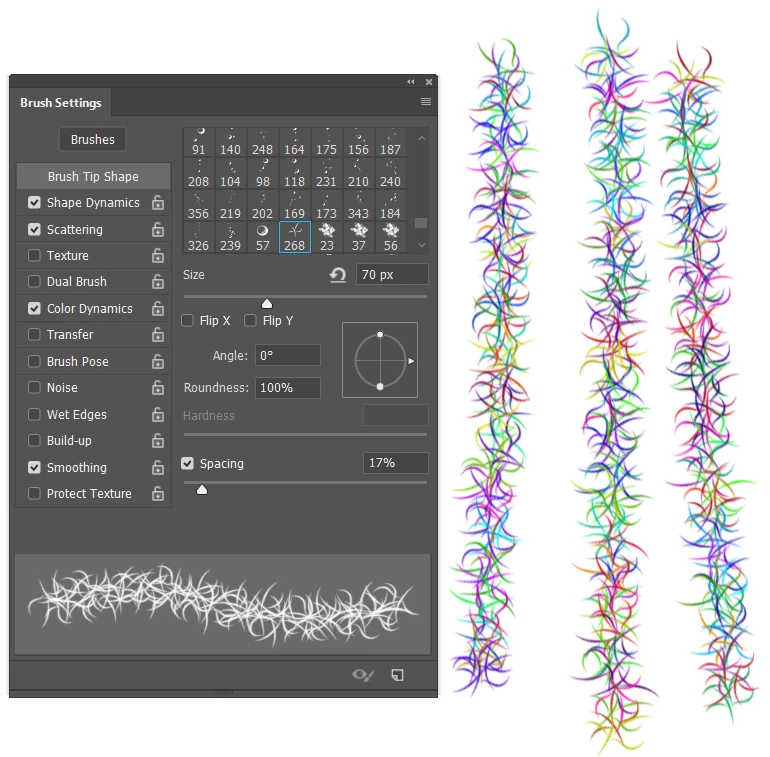
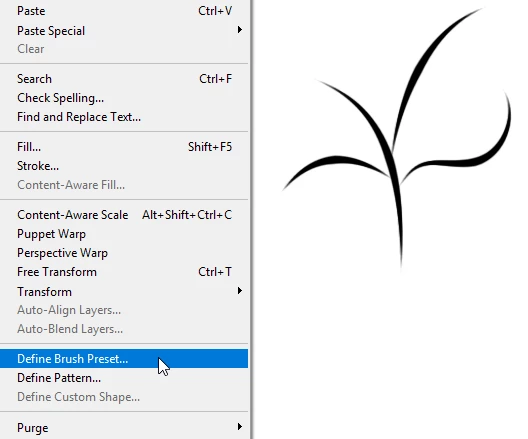
    So we make a graphic and define it as a new brush preset

    We give our new preset some tool settings

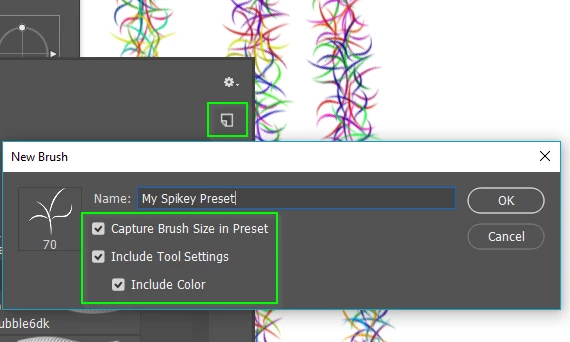
    But in order to keep these, we need to save the preset again, ticking the relevant settings.

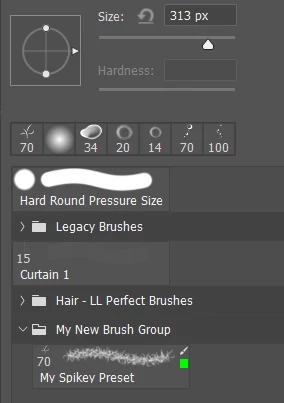
    Even then we are not safe from losing it.  To achieve lasting peace of mind, make a new Brush Group, and drag your new preset into it

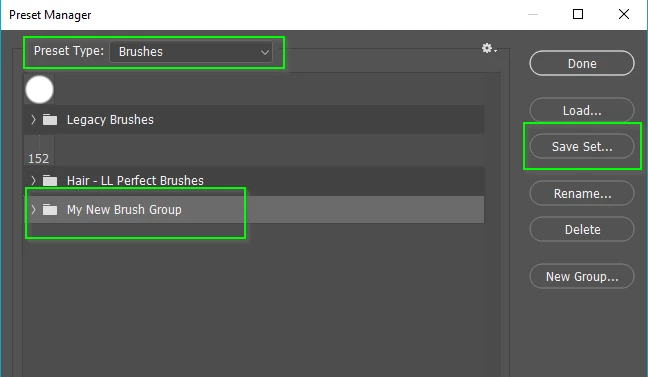
    Then open the Preset Manager and save the new group. It will then save to an ABR file that you can share etc,

    2 replies

    Bojan Živković11378569
    Community Expert
    Community Expert
    January 27, 2019

    Did you tried to lock Build Up in Brush Settings panel?

    Known Participant
    January 28, 2019

    Yes. The brush just went back to default.

    Trevor.Dennis
    Community Expert
    Community Expert
    January 28, 2019

    susyjewelry  wrote

    Yes. The brush just went back to default.

    Yes, it will do.  You need to save it as a new preset with the settings you require.  I gave you the steps in post #2

    Trevor.Dennis
    Community Expert
    Trevor.DennisCommunity ExpertCorrect answer
    Community Expert
    January 27, 2019

    I don't know what presets you are using, but there is a tiny gotcha with the new brush management system that came with CC2018.  It's lovely that we can now so easily save presets with tool settings, but if you are making a new preset from scratch, then as far as I can make out, you need to save it twice.

    So we make a graphic and define it as a new brush preset

    We give our new preset some tool settings

    But in order to keep these, we need to save the preset again, ticking the relevant settings.

    Even then we are not safe from losing it.  To achieve lasting peace of mind, make a new Brush Group, and drag your new preset into it

    Then open the Preset Manager and save the new group. It will then save to an ABR file that you can share etc,