November 27, 2011
Answered

Is this possible? crop selection....?

  • November 27, 2011
  • 2 replies
  • 1442 views

Hi Everyone!,

Is this possible?

we do this step more than 50 times every day.

1. Get selection from alpha mask.

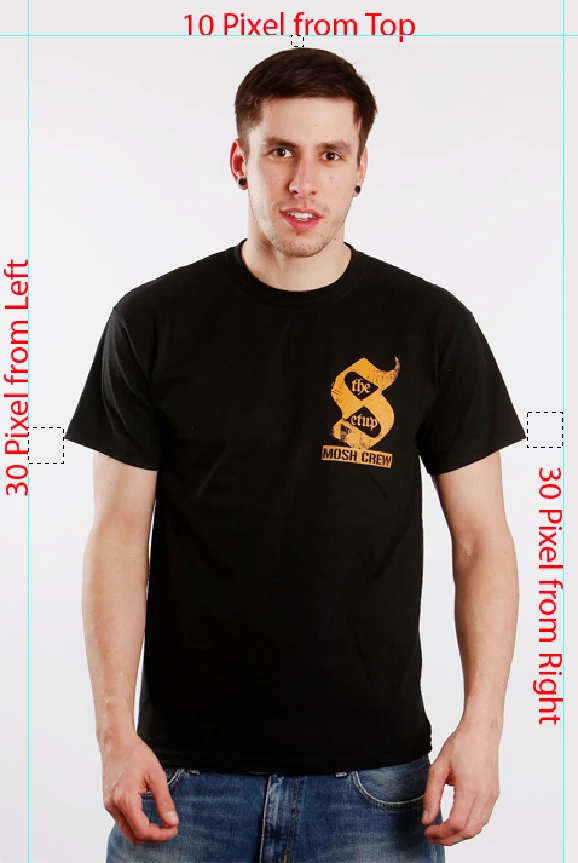
2. we add 10 pixel to top selection and left & right selection to add 30 pixel.

3.finally crop the image use that selection.

Thanks in advance. If anyone guide me how to write this script...?

find the attachment for more clarity.

-yajiv

This topic has been closed for replies.
Correct answer Paul Riggott

Please try this..

main();

function main(){

if(!documents.length) return;

try{

var doc = activeDocument;

if(doc.componentChannels.length != doc.channels.length){

if(doc.activeLayer.isBackgroundLayer) doc.activeLayer.isBackgroundLayer = false;

doc.selection.load(doc.channels[doc.componentChannels.length]);

addMask();

doc.trim(TrimType.TRANSPARENT);

var startRulerUnits = app.preferences.rulerUnits;

app.preferences.rulerUnits = Units.PIXELS;

doc.resizeCanvas(doc.width+60, doc.height, AnchorPosition.MIDDLECENTER);

doc.resizeCanvas(doc.width, doc.height+10, AnchorPosition.BOTTOMCENTER);

doc.flatten();

doc.channels[doc.componentChannels.length].remove();

app.preferences.rulerUnits = startRulerUnits;

    }

}catch(e){alert(e + " - " + e.line);}

}

function addMask(){

    var desc = new ActionDescriptor();

    desc.putClass( charIDToTypeID('Nw  '), charIDToTypeID('Chnl') );

        var ref = new ActionReference();

        ref.putEnumerated( charIDToTypeID('Chnl'), charIDToTypeID('Chnl'), charIDToTypeID('Msk ') );

    desc.putReference( charIDToTypeID('At  '), ref );

    desc.putEnumerated( charIDToTypeID('Usng'), charIDToTypeID('UsrM'), charIDToTypeID('RvlS') );

    executeAction( charIDToTypeID('Mk  '), desc, DialogModes.NO );

}
2 replies

c.pfaffenbichler
Community Expert
Community Expert
November 27, 2011

It is certainly possible.

A Selection’s Bounds-property gives the maximal left, top, right, bottom-coordinates of the Selection.

How is the corresponding alpha channel to be identified?

Is it the only additional Channel, the first, the last, does it have a specific name …?

Paul Riggott
Paul RiggottCorrect answer
Inspiring
November 27, 2011

Please try this..

main();

function main(){

if(!documents.length) return;

try{

var doc = activeDocument;

if(doc.componentChannels.length != doc.channels.length){

if(doc.activeLayer.isBackgroundLayer) doc.activeLayer.isBackgroundLayer = false;

doc.selection.load(doc.channels[doc.componentChannels.length]);

addMask();

doc.trim(TrimType.TRANSPARENT);

var startRulerUnits = app.preferences.rulerUnits;

app.preferences.rulerUnits = Units.PIXELS;

doc.resizeCanvas(doc.width+60, doc.height, AnchorPosition.MIDDLECENTER);

doc.resizeCanvas(doc.width, doc.height+10, AnchorPosition.BOTTOMCENTER);

doc.flatten();

doc.channels[doc.componentChannels.length].remove();

app.preferences.rulerUnits = startRulerUnits;

    }

}catch(e){alert(e + " - " + e.line);}

}

function addMask(){

    var desc = new ActionDescriptor();

    desc.putClass( charIDToTypeID('Nw  '), charIDToTypeID('Chnl') );

        var ref = new ActionReference();

        ref.putEnumerated( charIDToTypeID('Chnl'), charIDToTypeID('Chnl'), charIDToTypeID('Msk ') );

    desc.putReference( charIDToTypeID('At  '), ref );

    desc.putEnumerated( charIDToTypeID('Usng'), charIDToTypeID('UsrM'), charIDToTypeID('RvlS') );

    executeAction( charIDToTypeID('Mk  '), desc, DialogModes.NO );

}

November 27, 2011

Hi Paul,

Thanks for your reply.

Its awesome code. but background color was changed after run the script.

Actulally I also done this code from earlier with this reference link  http://forums.adobe.com/thread/581846)

Thanks for your support....

-yajiv

if(documents.length){

var startRulerUnits = app.preferences.rulerUnits;

app.preferences.rulerUnits = Units.PIXELS;

try {

    var docRef = app.activeDocument;

    var myChannels = docRef.channels;

    var selAlpha;

    selAlpha=myChannels.getByName("Alpha 1")

    docRef.selection.load(selAlpha, SelectionType.REPLACE, false);


    var SB = activeDocument.selection.bounds;

    var X1=SB[0]-30;

    var Y1=SB[1]-8;

    var X2=SB[2]+29;

    var Y2=SB[3];

    CropSel(X1,Y1,X2,Y2);

    app.preferences.rulerUnits = startRulerUnits;

    } catch (e) {

       app.preferences.rulerUnits = startRulerUnits;

       alert(e);

        }

    }

function CropSel(x1,y1,x2,y2){

var id2711 = charIDToTypeID( "Crop" );

    var desc517 = new ActionDescriptor();

    var id2712 = charIDToTypeID( "T   " );

        var desc518 = new ActionDescriptor();

        var id2713 = charIDToTypeID( "Top " );

        var id2714 = charIDToTypeID( "#Rlt" );

        desc518.putUnitDouble( id2713, id2714, y1 ); //y1

        var id2715 = charIDToTypeID( "Left" );

        var id2716 = charIDToTypeID( "#Rlt" );

        desc518.putUnitDouble( id2715, id2716, x1 ); //x1

        var id2717 = charIDToTypeID( "Btom" );

        var id2718 = charIDToTypeID( "#Rlt" );

        desc518.putUnitDouble( id2717, id2718, y2 );//y2

        var id2719 = charIDToTypeID( "Rght" );

        var id2720 = charIDToTypeID( "#Rlt" );

        desc518.putUnitDouble( id2719, id2720, x2 );//x2

    var id2721 = charIDToTypeID( "Rctn" );

    desc517.putObject( id2712, id2721, desc518 );

    var id2722 = charIDToTypeID( "Angl" );

    var id2723 = charIDToTypeID( "#Ang" );

    desc517.putUnitDouble( id2722, id2723, 0.000000 );

    var id2724 = charIDToTypeID( "Wdth" );

    var id2725 = charIDToTypeID( "#Pxl" );

    desc517.putUnitDouble( id2724, id2725, 0.000000 );

    var id2726 = charIDToTypeID( "Hght" );

    var id2727 = charIDToTypeID( "#Pxl" );

    desc517.putUnitDouble( id2726, id2727, 0.000000 );

    var id2728 = charIDToTypeID( "Rslt" );

    var id2729 = charIDToTypeID( "#Rsl" );

    desc517.putUnitDouble( id2728, id2729, 0.000000 );

executeAction( id2711, desc517, DialogModes.NO );


    }

Inspiring
November 27, 2011

You only need to make the selection to read the bounds array, after that why not just use the DOM crop and pass new values?

if(documents.length){

var startRulerUnits = app.preferences.rulerUnits;

app.preferences.rulerUnits = Units.PIXELS;

try {

          var docRef = app.activeDocument;

          docRef.selection.load(docRef.channels.getByName("Alpha 1"), SelectionType.REPLACE, false);

          var SB = docRef.selection.bounds;

          docRef.crop( [SB[0]-30,SB[1]-10,SB[2]+30,SB[3]] );

          app.preferences.rulerUnits = startRulerUnits;

          } catch (e) {

                    app.preferences.rulerUnits = startRulerUnits;

                    alert(e);

          }

}