Inspiring
September 13, 2018
Answered

Issue after last update

  • September 13, 2018
  • 2 replies
  • 1026 views

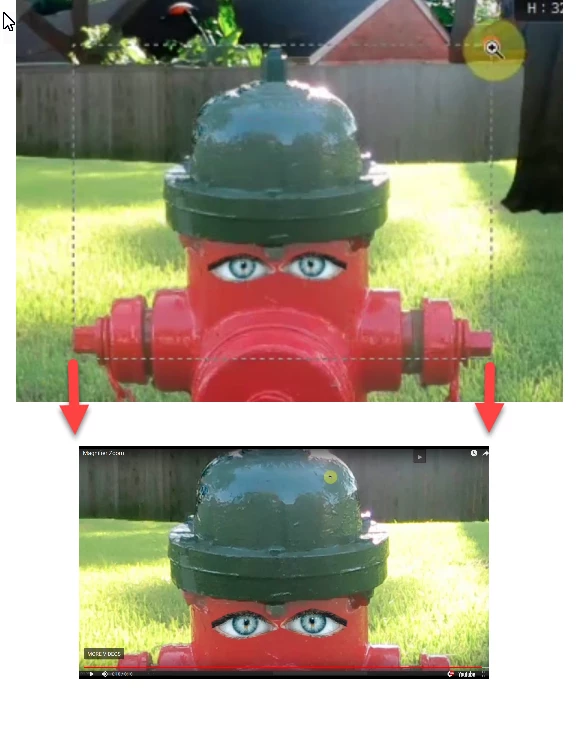
I often use the magnifying glass tool to outline an area and zoom in.  Since the last update it no longer zooms the area outlined, instead the area is too small. Are others having this problem?

NOTE: This was the second issue in an earlier post.  The first was solved but this one was ignored so I'm making it a post of its own.
    This topic has been closed for replies.
    Correct answer davescm

    Okay, I made a screen video.  Note in the video I take care to make the outline extend from the left to right tips of the object and to the top of the top nut. You will see it better if you enlarge the video.  I don't know how to stop YouTube videos from going on to another.


    Hi

    Watching your video Photoshop looks like it is zooming to the width you have highlighted but because your screen viewing area aspect ratio does not match the aspect ratio you used when zooming, the height is clipped. The alternative would be Photoshop zooms to the height but does not zoom in far enough in on the width.  It can only do both if the rectangle you specify matches the viewing area aspect ratio.

    Dave

    2 replies

    Inspiring
    September 14, 2018

    If you think you are doing everything right and if all else fails just reset your preferences. It is in under Edit>Preferences>General or Photoshop CC>Preferences>General. Just check on "Reset Preferences on Quit" and restart Photoshop.

    i_am_jimAuthor
    Inspiring
    September 14, 2018

    Thanks Katie

    I'm reluctant to reset all my preferences as I have quite a few.  I think the cost of resetting all preferences outweighs this issue.  I prefer to fix this but I can substitute scrubby zoom.

    . Windows 10 -- Premiere Elements 2018 -- Photoshop CC
    Community Expert
    September 13, 2018

    Can you give more information on what's happening - perhaps with a screenshot of the result?I'm not following exactly what occurs when you try zoom into a part of your image.

    i_am_jimAuthor
    Inspiring
    September 13, 2018

    Thanks for your interest.

    It's impractical to make a screen shot of this.  It would have to be a screen recording/screen casting.

    Have you used the magnifying glass to outline an area of an image in order to zoom in on the area?  If not, that's why you don't understand.

    . Windows 10 -- Premiere Elements 2018 -- Photoshop CC
    Norman Sanders
    Legend
    September 13, 2018

    You may be looking for these adjustment options in Preferences > Tools