
Participant
February 11, 2022
Question

Issue with brush opacity on layer mask

  • February 11, 2022
  • 1 reply
  • 1768 views

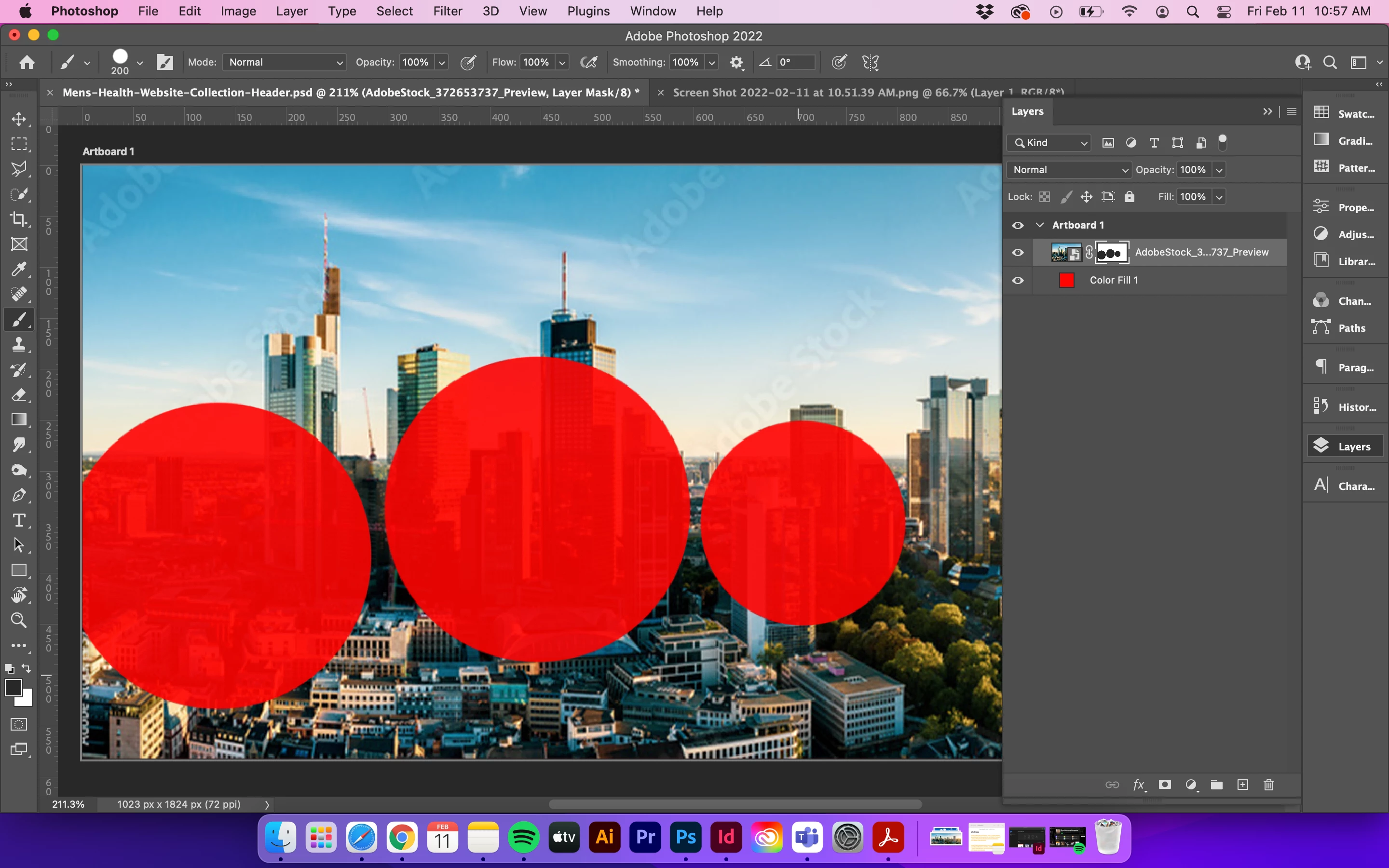
In the past adding a mask on a layer (in this example on the layer with the city image), and then using the brush tool would reveal the bottom layer (in this example the red layer).

However, now the brush won't fully reveal the bottom (red) layer at 100%.  The city layer is still visible where the brush tool was applied. Am I missing something, or did Photoshop change something?

I have the brush set at normal/ 100% opacity.

Using Photoshop 23.1.0


This topic has been closed for replies.

1 reply

Chris 486
Community Expert
Community Expert
February 11, 2022

Hi Adrian!


It's hard to tell in your screenshot but it looks like you are painting with a dark gray and not black. You will need 100% black to have full transparency. Let us know if that fixes it.


-Chris

Participant
February 11, 2022

Oh goodness! Thank you Chris, you are a lifesaver. I can't believe I overlooked that. Very impressize that you could spot the difference! It was indeed a dark gray. You have an eagle eye! Thank you!

Chris 486
Community Expert
Community Expert
February 11, 2022

That has tricked me more times then I'd like to admit. You can tweak so many options, it can be hard to remmeber what to check!