


Answered
Issue with Brush Tool Display
When using identical Brush Tool settings (size and 100% hardness), a noticeable difference in behavior is observed across different platforms. On Windows, the fill area is uniformly applied within the cursor outline, whereas on a MacBook, the cursor displays lines with a larger diameter than the actual fill, resulting in incorrect cursor boundary representation.
This inconsistency poses challenges during precise painting, particularly when working along object edges. In my opinion, this appears to be a bug in the program, as the tool functions correctly on Windows. The issue might be related to the way screen resolution is handled across different platforms.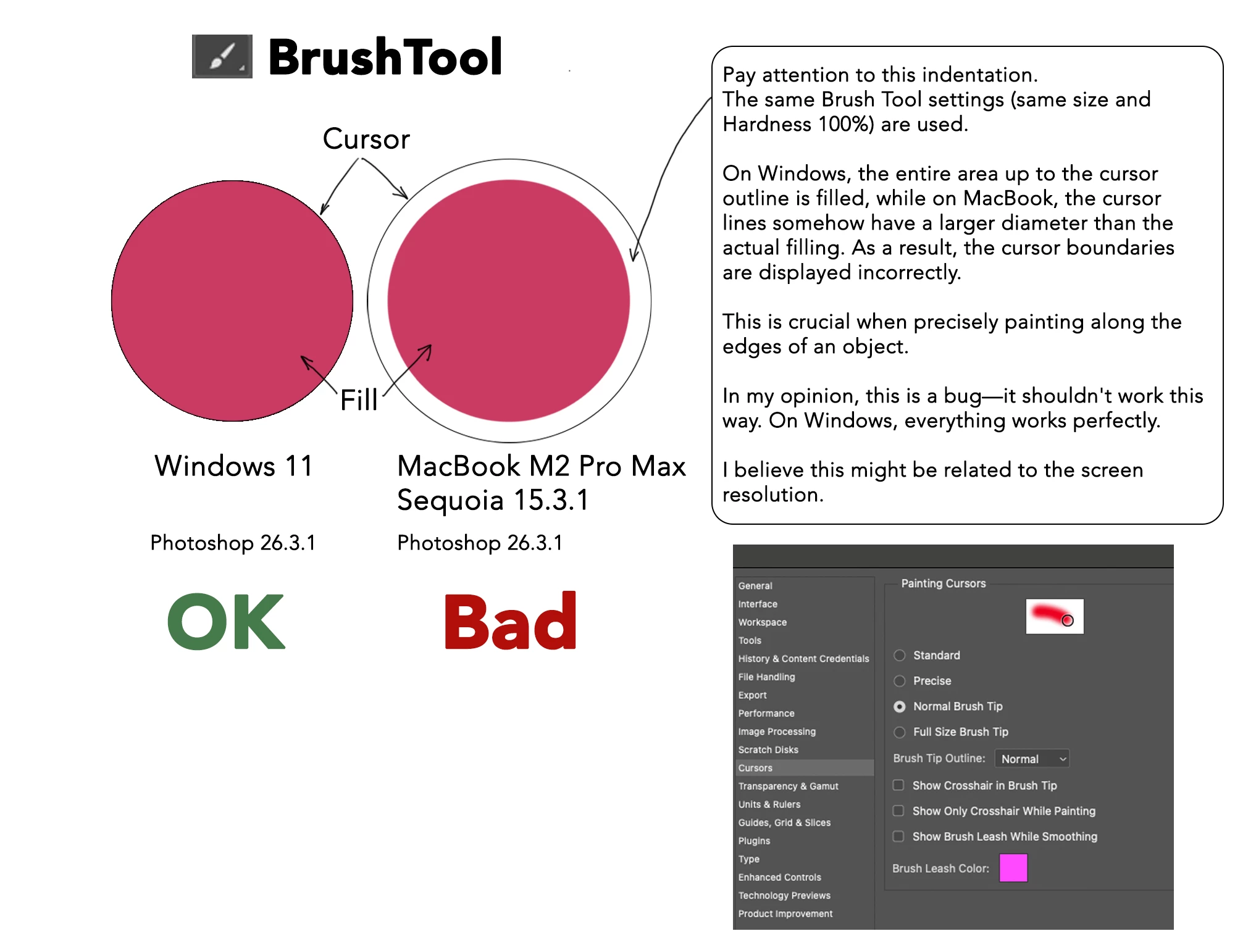
To Report a Bug, Provide:
- Version of the App
The issue occurs in Adobe Photoshop version 26.3.1. - Platform and OS Version
The bug is observed on a MacBook M2 Pro Max running macOS Sequoia 15.3.1. For comparison, the tool works correctly on Windows 11. - Basic Steps to Reproduce the Problem
- Open Adobe Photoshop 26.3.1.
- Select the Brush Tool.
- Set the brush size to a specific value (e.g., 50 pixels) and hardness to 100%.
- Attempt to paint along the edge of an object or on a blank canvas.
- Observe the cursor display and the actual fill area. On macOS, the cursor outline appears larger than the actual painted area, leading to inaccurate painting.
- Expected Result and Actual Result
- Expected Result: The cursor outline should match the actual fill area, allowing precise painting, as seen on Windows 11.
- Actual Result: On macOS Sequoia 15.3.1, the cursor outline displays a larger diameter than the actual fill, causing misalignment and making precise painting difficult, especially along object edges.
- Optional: Test File, Screenshot, Video, or GIF Capturing the Issue
A screenshot was provided in the original post, showing the difference in cursor behavior between Windows 11 (correct) and MacBook M2 Pro Max (incorrect). The image includes two circles: one labeled "Windows 11" (OK) and the other labeled "MacBook M2 Pro Max" (Bad), illustrating the discrepancy in cursor outline and fill.

 AdChoices