


Participating Frequently
August 26, 2017
Answered

Issues with colors in Photoshop CC

  • August 26, 2017
  • 3 replies
  • 1529 views

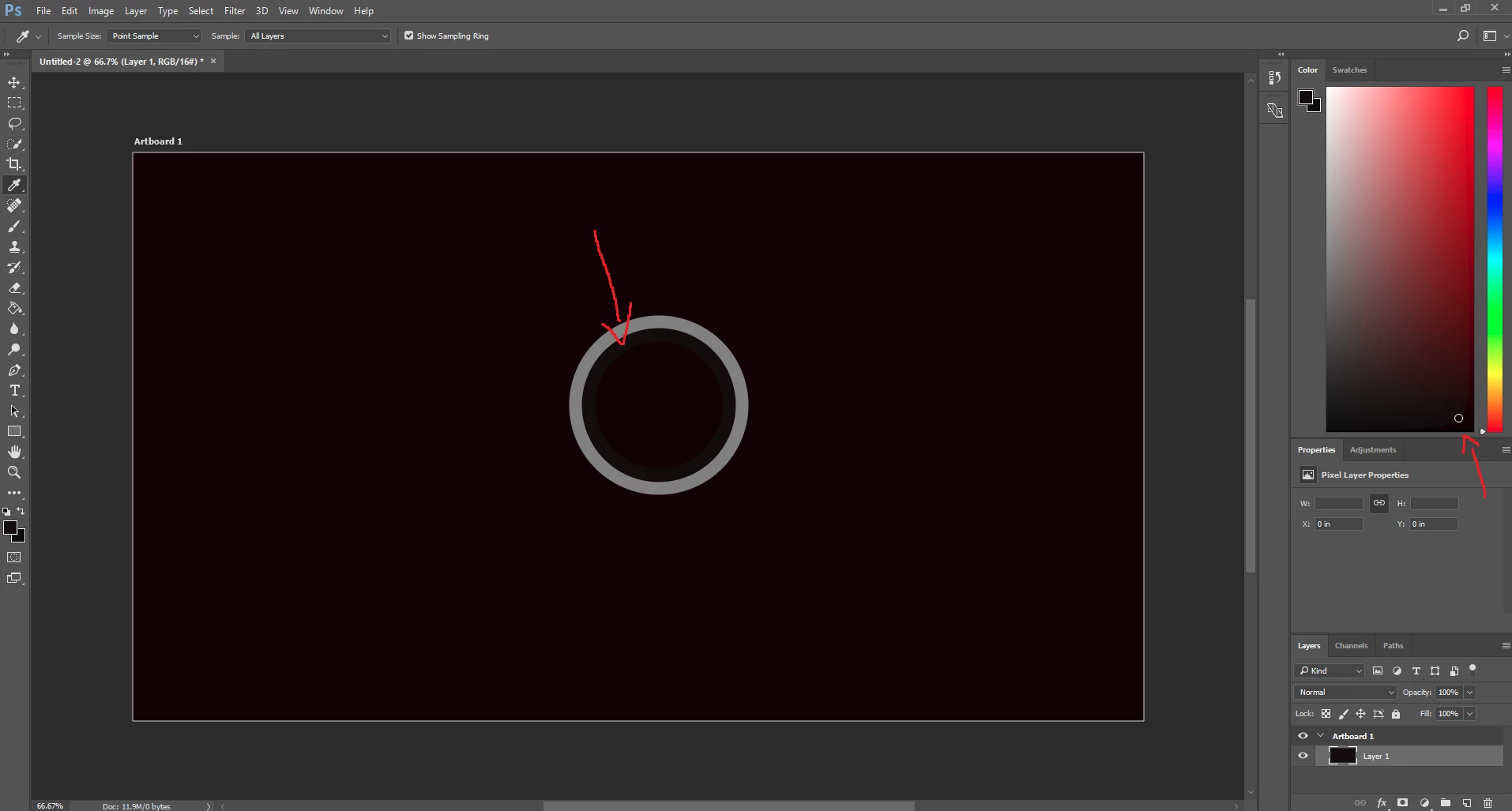
Hello, I'm having an issue with colors in Photoshop CC and I've searched everywhere but I can't seem to find the answer. I've recently purchase a Gigabyte Aero 15 laptop that comes with a pantone x-rite certified calibration. The problem is when I'm using Photoshop the colors are different than when viewing something in windows photo viewer for example. Also, the color picker shows different colors than the document. So if I use the eyedropper tool, the ring sample shows a different color. However, it is the same color value, the same hex. I'm not sure what's going on here.

I've attached a screenshot I took (using print screen key) and saved in MSPaint. Below you can see the arrows pointing to the color picker ring and the hue cube which has odd banding in the lower right corner.
    This topic has been closed for replies.
    Correct answer gener7

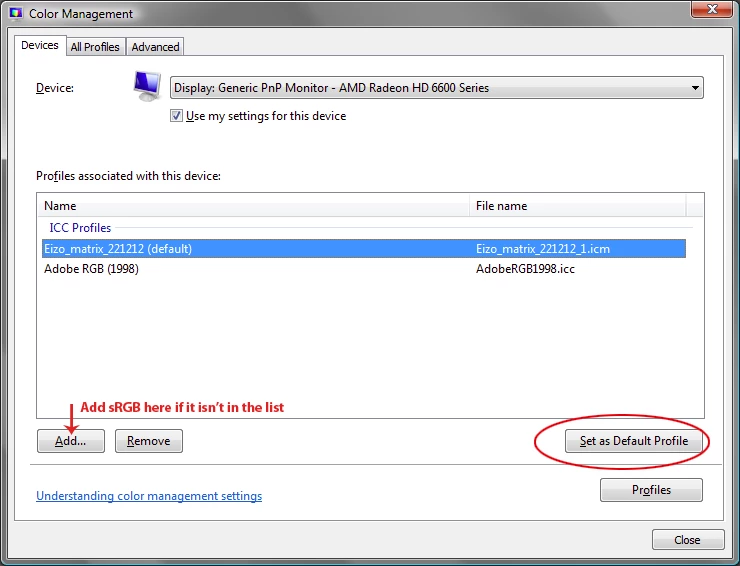
    You may want to switch from your Pantone calibrated profile to Windows sRGB and see if that helps. You'll keep the old profile, it won't be removed. It just won't be the default. Restart your PC after the change.

    3 replies

    D Fosse
    Community Expert
    Community Expert
    August 27, 2017

    If this is a screenshot, that just confirms my point. A screenshot is in Monitor RGB, which is different from sRGB or Adobe RGB. The same numbers will yield a different color, or conversely, the same color will have different numbers.

    To get consistency between the original file and a screenshot of the same, you need to first assign the monitor profile to the screenshot, then convert to whatever standard profile the original file is in.

    Connorr7Author
    Participating Frequently
    August 27, 2017

    That screenshot is more or less what I see when I'm in photoshop. I just want to know why my eyedropper shows different colors than what it's sampling. I can't seem to get them in sync. I'm not worried if the screenshot is exactly the same as photoshop, I only used it to show what I'm experiencing. I don't have this problem on my other computer/monitor, just my Aero 15. Could it have something to do with this X-rite pantone calibrated display which uses an icc profile enforced through their "Smart Manager" program?

    gener7
    Community Expert
    gener7Community ExpertCorrect answer
    Community Expert
    August 27, 2017

    You may want to switch from your Pantone calibrated profile to Windows sRGB and see if that helps. You'll keep the old profile, it won't be removed. It just won't be the default. Restart your PC after the change.

    D Fosse
    Community Expert
    Community Expert
    August 27, 2017

    Windows Photos is not color managed. It's not supposed to match Photoshop, it never will. Photoshop is right, Windows Photos is wrong.

    Color managed means that a monitor profile, which describes very accurately how the monitor displays color, is used to correct the RGB values that are sent to the monitor. This is a standard profile conversion, just like any other profile conversion, only it's done by Photoshop on the fly, as you work, under the covers.

    An application that isn't color managed doesn't do this. It just sends the RGB numbers straight through uncorrected.

    RGB/hex numbers do not define a color. The color space defines the numbers as a specific color. A color space is e.g. sRGB, Adobe RGB, or your display's native color space. They're all different, and any given RGB triplet produces different actual colors in these different color spaces.

    A monitor profile is normally made with a calibrator, by measuring test patches on screen and writing out the results as an icc profile. This profile is a description of the display color space. It doesn't correct anything in itself, it just tells Photoshop's color management module what to do to correct the RGB data for display.

    Connorr7Author
    Participating Frequently
    August 27, 2017

    Thank you for clarifying that for me. How can I tell which programs are color managed and which are not? (This still however doesn't clear up my issue with the photoshop hue cube/ eyedropper)

    gener7
    Community Expert
    Community Expert
    August 27, 2017

    I notice your artboard is 16 bit, what is the document color profile? You can find out here in the Status bar:

    If it is other than sRGB, perhaps Photoviewer is not color managed and would render the colors differently because it cannot read the profile.

    If that is the case, convert a copy to sRGB and see if the results are better.

    Connorr7Author
    Participating Frequently
    August 27, 2017

    My document was "untagged RGB", however after changing it, there was still a discrepancy between the hue cube/ eyedropper and the document color. (As shown in my picture)