
Participant
September 15, 2017
Question

jagged lines on pen tool shapes?

  • September 15, 2017
  • 4 replies
  • 9497 views

Hi all,

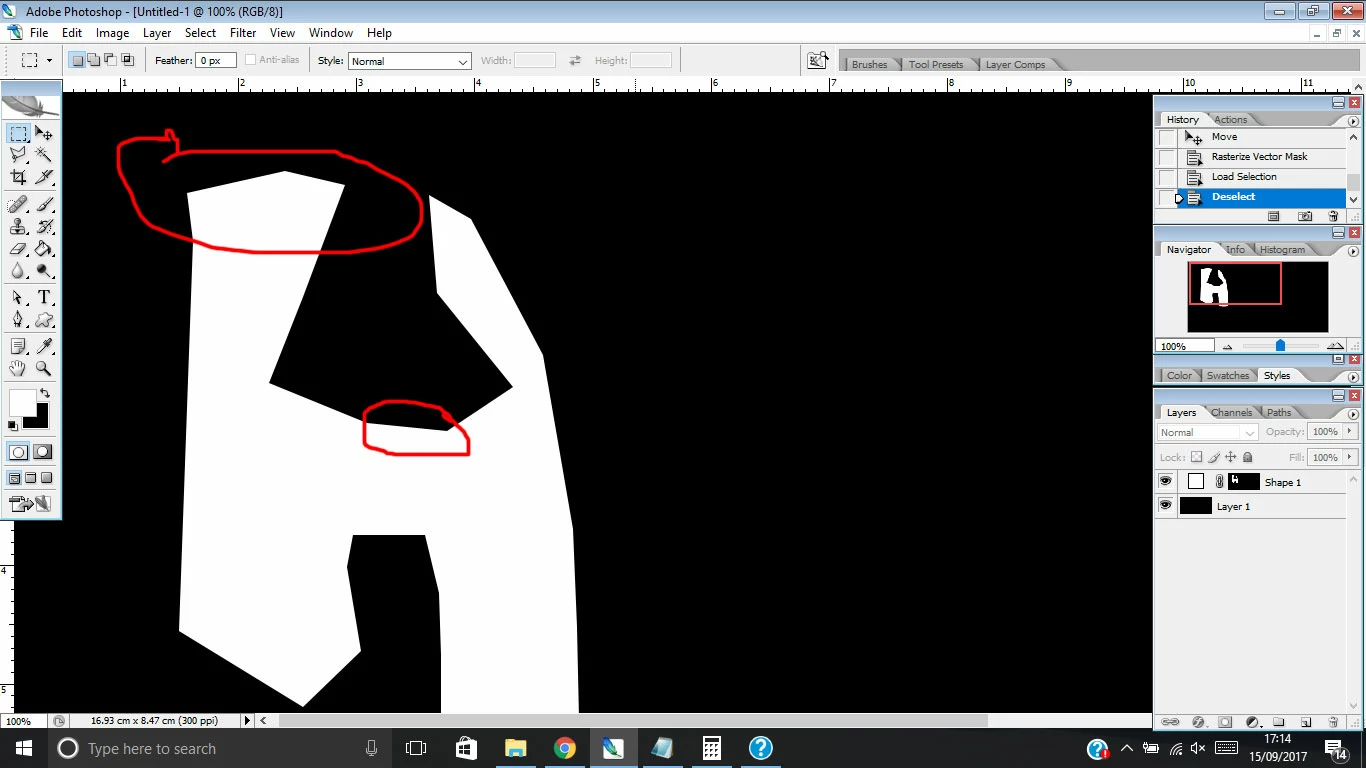
I'm trying to create different shapes using the pen tool on 300dpi surface but most of the lines that are not perfectly straight appear jagged or blurry. I thought the pen tool is supposed to create smooth shapes or am I missing something? Is there a way to get these lines crips without appearing jagged, I don't want to blur the edges just want a smooth line.
    This topic has been closed for replies.

    4 replies

    HustleOnAuthor
    Participant
    September 16, 2017

    is it maybe also an issue with my display? I'm using a notebook with 1366x768 resolution, which probably is responsible for some images to appear with jagged/blurry outlines?

    Semaphoric
    Community Expert
    Community Expert
    September 16, 2017

    What is the size of your notebook screen?

    JJMack
    Community Expert
    Community Expert
    September 16, 2017

    It more than size it is mostly about resolution.  To be sharp smooth and crisp you need small high quality pixels and you need many of them.There are displays that have low dpi resolution and displays theat have high DPI resolutions. Displays can not change the size of the pixels they display.  Printers do not print using pixels the paint in pixels using many smaller droplets of ink they can paint in different size pixels.  DPI is pixel size.  Displays are manufactured with one size pixels.  The either have a low resolution or a high resolution or some resolution  in between.     You can have a 5" screen with a low resolution or one with a high resolution. I have display one my pc the has 82DPI, 96Dpr, 100,dpi and 185DPI I have a surface pro 3 with a 216dpi display and and android that has a 359dpi resolution and the new iPhone display's resolution will be something like 458dpi.   The human eye in a young person may be able to resolve down  to that resolution up close and personal.

    It a physical thing. Pixel density and the quality of those pixels.

    The 1" circle I posted displays like 8" on one of my displays 4" on an other  and less the 2" on my android even on I iPhoneX it would display over an inch in size. For no display has a pizel size the is 1/500"x1/500" of and inch.  A printer can paint that image 1"x1" The circle will be 1" sharp and smooth in yoy eyes. Yoe will meed a mignifier to see that actual pixels are square. The image is 250,000pixels  1/4MP

    JJMack
    Theresa J
    Community Expert
    Community Expert
    September 16, 2017

    Looks like you used the pen tool to create a layer mask on a shape layer. The layer mask is made of pixels, which is what you are seeing that looks soft. The higher the pixel count of the document, the sharper the layer mask will look.

    Drawing a shape layer with the pen tool will create a vector which can be infinitely scaled up or down. It will still display on screen at the pixel dimensions of the document, but if you increase the size of your file, the shape will appear sharper.

    You haven't actually drawn a vector shape layer. You have just masked one with pixels.

    Participant
    August 5, 2023

    Hi Theresa, If this is the case, how do you actually draw a vector shape layer instead of masking one with pixels?

    Nancy OShea
    Community Expert
    Community Expert
    August 5, 2023
    quotehow do you actually draw a vector shape layer instead of masking one with pixels?
    By @kelly31510492po6v

    ==========

    You've resurrected a topic from 2017.  I'm not Theresa.


    That said, change Pen Tool option from path or pixels to Shape.  See screenshot.


    Or use one of the Shape Tools.


    Hope that helps.


    Nancy O'Shea— Product User & Community Expert
    mglush
    Community Expert
    Community Expert
    September 16, 2017

    What is your end result of your art--Is this for print or is this for screen display?

    JJ is right--what you are looking at is the monitor's resolution displaying your line. If your artwork is going to be printed, then the printer will interpret the art and give you a smoother line.

    Let us know?

    Michelle

    HustleOnAuthor
    Participant
    September 16, 2017

    Hi Michelle,

    it is for a website logo, around 500pixel width but looks all jagged and blurry which is not a great sharp look I want for a logo.

    if you look at the lines of the shapes (black,white,red) vs the smooth lines of the font, it makes it look unsharp and jagged.

    JJMack
    Community Expert
    Community Expert
    September 15, 2017

    How smooth a line will be when it is rendered depends on size and resolution.  If you want smooth and sharp you have to edit high resolution image and render them on devices capable of rendering high resolution image like printers and the iPhoneX .  Your display is most likely not up to the task.  And you images resolution is also lower than you want.

    Here is a 1" 500dpi circle is it 1" on your display even on an iPhoneX it would display larger than 1" Display use their dpi resolution. Not the Image's DPI setting.

    JJMack