
Inspiring
September 1, 2015
Answered

Javascript close and save changes without JPG quality dialogue

  • September 1, 2015
  • 5 replies
  • 1886 views

I am working on a script that exports images from Illustrator and resizes them in Photoshop to be the proper height/width/dpi we need. I send the command through BridgeTalk, and the resize works great, but when I try to use doc.close(SaveOptions.SAVECHANGES); PS stops on each image with a JPEG quality dialogue box.
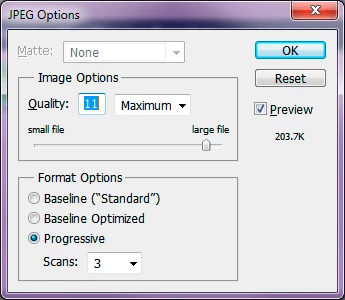
Is there anyway around this dialogue? I know I can do a save as, but that forces JPG to be the file type and sometimes we export PNGs using the same script, so it becomes a much more complicated script if I have to add conditions and save options for both file types and send via bridge talk. I just want it to save in whatever file format it already was and keep moving. Is there a force save that overrides any dialogs? I also tried a line of code for turning dialogs off (displayDialogs = DialogModes.NO), but that didn't seem to work either. Is it possible to work around this or do I have to go the other way and make the script conditional and use save as. The annoying part is it works perfectly for the PNGs! Thanks in advance for any help!

This topic has been closed for replies.
Correct answer JJMack

When I run your code on a jpg document that had been saved by Photoshop in the past.  That is I open a jpg file that was was saved by Photoshop and the use fit image to resize the image and run your close code "app.activeDocument.close(SaveOptions.SAVECHANGES)" I get no POPUP quality dialog.  It must be because your file was saved by illustrator as a jpeg the Photoshop does not know at what quality the jpeg file had been saved with.

5 replies

RESlyderAuthor
Inspiring
September 2, 2015

Thanks for looking into that JJ! Great catch and that totally makes sense. I appreciate the help guys!

Chuck Uebele
Community Expert
Community Expert
September 2, 2015

From what JJMack discovered, it does look like your best option would be to use a saveas in your script.

RESlyderAuthor
Inspiring
September 2, 2015

I Had tried the displayDialogs but no dice. I know I can do save as but I use both pngs and jpegs

so i would like to avoid having to send a big conditional statement through bridge talk. I just want to know if it's possible to suppress that specific dialog somehow.

Thanks for offering those suggestions!

JJMack
Community Expert
JJMackCommunity ExpertCorrect answer
Community Expert
September 2, 2015

When I run your code on a jpg document that had been saved by Photoshop in the past.  That is I open a jpg file that was was saved by Photoshop and the use fit image to resize the image and run your close code "app.activeDocument.close(SaveOptions.SAVECHANGES)" I get no POPUP quality dialog.  It must be because your file was saved by illustrator as a jpeg the Photoshop does not know at what quality the jpeg file had been saved with.

JJMack
JJMack
Community Expert
Community Expert
September 2, 2015

Use Save As Jpeg function then close the active document

SaveAsJPEG("Name",10)

activeDocument.close(SaveOptions.DONOTSAVECHANGES);

function SaveAsJPEG(saveFile, jpegQuality){

  var doc = activeDocument;

  if (doc.bitsPerChannel != BitsPerChannelType.EIGHT) doc.bitsPerChannel = BitsPerChannelType.EIGHT;

  jpgSaveOptions = new JPEGSaveOptions();

  jpgSaveOptions.embedColorProfile = true;

  jpgSaveOptions.formatOptions = FormatOptions.STANDARDBASELINE;

  jpgSaveOptions.matte = MatteType.NONE;

  jpgSaveOptions.quality = jpegQuality;

  activeDocument.saveAs(File(saveFile+".jpg"), jpgSaveOptions, true,Extension.LOWERCASE);

}

JJMack
Chuck Uebele
Community Expert
Community Expert
September 2, 2015

Are you including this?

  app.displayDialogs = DialogModes.NO;