jpeg compression quality not a smooth scale?
More of an observation than a question. I use Photoshop to edit photos for web display and have noticed that quite often saving at compression value ('quality') 6 produces larger file sizes than for value 7. It appears that the compression algorithm is not following a smooth line, or that perhaps values and 6 and 7 are too close together on the scale? Has anyone else noticed this?
Here are the values (in kB) for a typical landscape photo (1080 x 720 px) with very high detail, from 1 to 10 (6 and 7 highlighted):
200.2, 225.2, 270.0, 300.4, 336.7, 384.6, 377.7, 463.3, 551.2, 692.7
Another photo, moderate detail, 1080 x 1200 px:
168.1, 209.7, 283.5, 326.4, 378.2, 447.0, 434.7, 546.0, 664.0, 842.5
This one was less detailed with plain background (1080 x 900 px):
77.9, 91.3, 108.7, 121.1, 137.7, 164.1, 169.9, 215.6, 268.8, 351.8
As Excel chart:
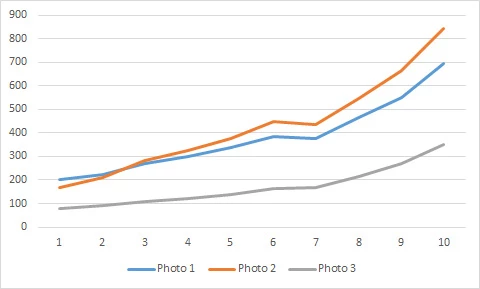
In the first two, value 6 gives higher file size than value 7, but in the third 7 is higher than 6 as should be the case, though the values in all cases are very close together. I haven't shown values for 11 and 12 - these tend to produce quite a steep line at the end of the scale, with much higher file sizes.
I've experimented briefly with much larger pixel sizes and the same thing seems to happen on shots with high amount of detail, but not with plain backgrounds. Presumably it is simply a peculiarity of the compression algorithm, but it shouldn't really be doing this should it?
John, UK
 AdChoices