Participant
December 16, 2024
Question

JPEG save quality

  • December 16, 2024
  • 4 replies
  • 465 views

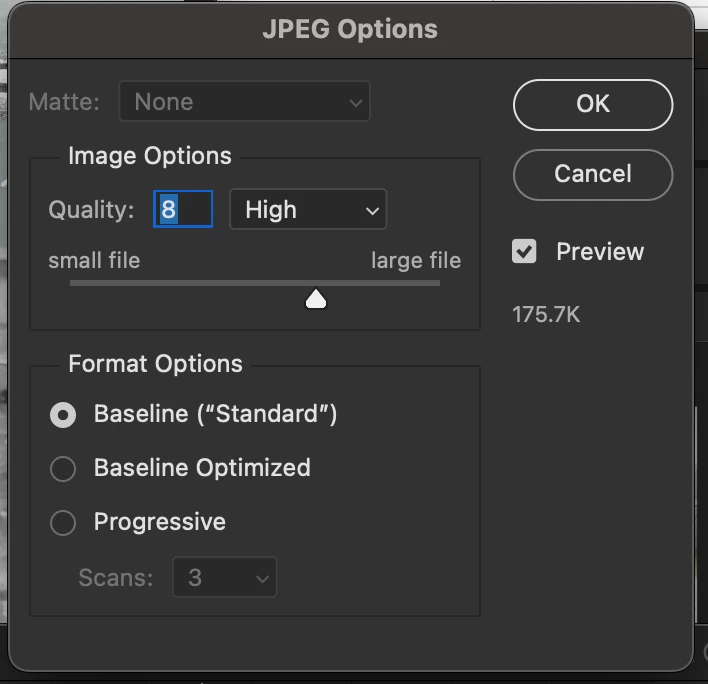
Where do these quality number values come from? It's always different... I want all of my jpeg saves to always default to 12/max. Is there a way to do that?

 

This topic has been closed for replies.

4 replies

barbara_a7746676
Community Expert
Community Expert
December 16, 2024

Photoshop will default to whichever image quality you chose last.

Stephen Marsh
Community Expert
Community Expert
December 16, 2024
quote

Photoshop will default to whichever image quality you chose last.


By @barbara_a7746676


Agreed Barbara, unless one is overwriting a previously saved (not exported) JPEG from Photoshop, where it will use the compression level set in the file metadata.

Conrad_C
Community Expert
Community Expert
December 16, 2024

The JPEG save numbers are confusing because you can find at least three different JPEG quality scales in Photoshop and other Adobe photo apps:

  • Photoshop Save As/Save a Copy uses the 1–12 scale. 
  • Photoshop Export As goes from 1 to 7. 
  • Photoshop Save for Web and Camera Raw/Lightroom use a 0% to 100% scale. 


There is a guide to the 0%–100% scale, because how quality changes along it isn’t necessarily linear:

https://regex.info/blog/lightroom-goodies/jpeg-quality

D Fosse
Community Expert
Community Expert
December 16, 2024

I'm going to answer a question that wasn't asked. Feel free to ignore.


Here goes: saving jpegs at max quality basically defeats the purpose of the jpeg format.


The thing is, "max quality" isn't really max quality. Jpeg compression is always destructive and non-reversible. Every time you resave a jpeg, it degrades a little bit more. The only reason jpeg is still widely used, is that the jpeg compression is extremely effective. It can shrink a file down to 2 - 5 % of native size, with very little visual damage. The key is "very little".


Given that saving as jpeg always destroys the file a little, you may as well go for full payoff in terms of size reduction. The best compromise between file size and data damage is never at max. Going down from 12 to, say, 8, means a huge saving in file size - but still very little direct visual damage. It most likely cannot be distinguished from 12.


The main thing is to never use jpeg for archival purposes. It is for one-time final delivery.

Trevor.Dennis
Community Expert
Community Expert
December 17, 2024

I've never used JPG 12 in my life other than to test it.

Wikipedia has a good article on how it works.


Stephen Marsh
Community Expert
Community Expert
December 16, 2024

If you want quality 12 to default, regardless of other factors, then create an interactive action with this setting (as the image below indicates with the highlighted "modal control"), or use a script.


If you are re-saving a JPEG that was previously saved (not exported) from Photoshop, then the quality level is stored in the file. The action or script will override the value stored in the file.