



Answered
[JSX] Issue creating shape from subpathitem
I am creating a workpath out of a selection, and trying to convert that to a shape. Consider the path drawn by selection.makeWorkPath(.5) below.
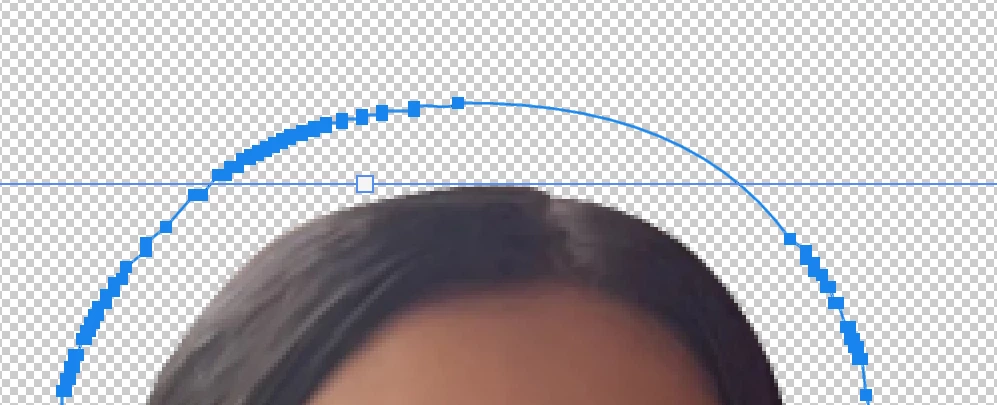
Not sure why the tolerance is so low on the right top portion of the head. If I attempt to draw a shape out of this path, using the following function, the lines connect horizontally, since there's no path points where the ought to be. I'm doing some image resizing first; I leave at original dimensions, I get more full path points.
The function I'm calling is:
DrawShape(doc.pathItems[0].subPathItems[0].pathPoints, newColor.rgb);
Draw Shape function is defined below (from the forums):
function DrawShape(args, color) {

    var doc = app.activeDocument;
    var y = args.length;
    var i = 0;

    var lineArray = [];

    for (i = 0; i < y; i++) {
        lineArray[i] = new PathPointInfo();
        lineArray[i].kind = args[i].kind;
        lineArray[i].anchor = args[i].anchor;
        lineArray[i].leftDirection = lineArray[i].anchor;
        lineArray[i].rightDirection = lineArray[i].anchor;
    }
    var lineSubPathArray = new SubPathInfo();
    lineSubPathArray.closed = true;
    lineSubPathArray.operation = ShapeOperation.SHAPEADD;
    lineSubPathArray.entireSubPath = lineArray;
    var myPathItem = doc.pathItems.add("myPath", [lineSubPathArray]);


    var desc88 = new ActionDescriptor();
    var ref60 = new ActionReference();
    ref60.putClass(stringIDToTypeID("contentLayer"));
    desc88.putReference(charIDToTypeID("null"), ref60);
    var desc89 = new ActionDescriptor();
    var desc90 = new ActionDescriptor();
    var desc91 = new ActionDescriptor();
    desc91.putDouble(charIDToTypeID("Rd  "), color.red); // R
    desc91.putDouble(charIDToTypeID("Grn "), color.green); // G
    desc91.putDouble(charIDToTypeID("Bl  "), color.blue); // B
    var id481 = charIDToTypeID("RGBC");
    desc90.putObject(charIDToTypeID("Clr "), id481, desc91);
    desc89.putObject(charIDToTypeID("Type"), stringIDToTypeID("solidColorLayer"), desc90);
    desc88.putObject(charIDToTypeID("Usng"), stringIDToTypeID("contentLayer"), desc89);
    executeAction(charIDToTypeID("Mk  "), desc88, DialogModes.NO);

    myPathItem.remove();
}
 AdChoices