Juan Cano
Inspiring
March 3, 2022
Question

Just puzzled and frustrated by artboards

  • March 3, 2022
  • 4 replies
  • 1217 views

Aaargh. I don't use Photoshop enough to builkd web banners, and not there is this Artboard thing and is driving me bananas. I don't get it. I read it and makes sense but then I am working on a banner and it;s messing evrything up. Stuff just moves and jumps and disappears. Soooooooo frustrating.


In this screenshot, I changed the size of a 728x90 banner to 300x250; firstly, I couldn't just change the Canvas size because it didn't do anything at all. So I went to the Artboard and changed it in the Artboard. And now I have this dark grey large rectangle that I don't know what it is; layers move in and out of the Artboard.....
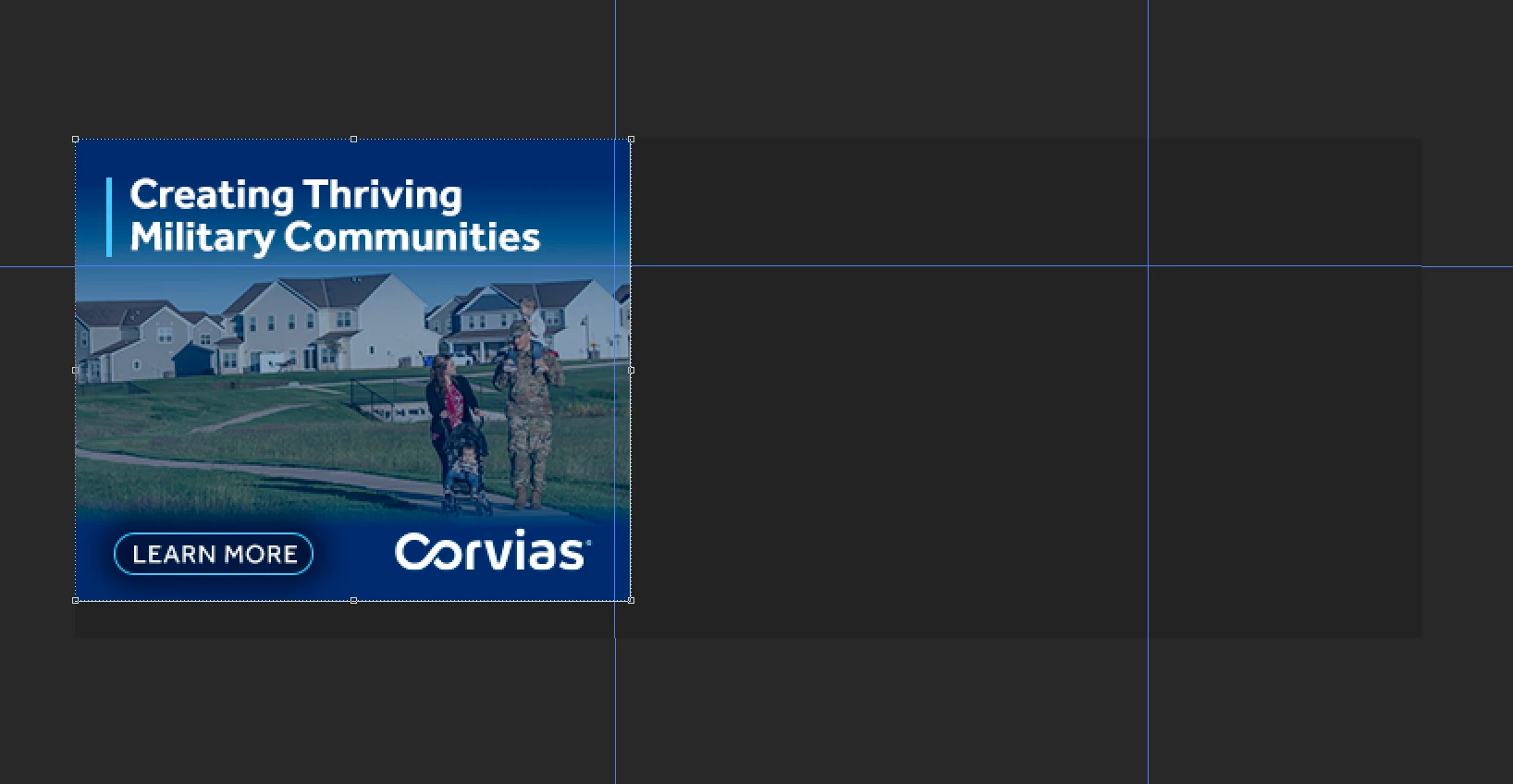
 

Any tips? What am I missing? Can I remove the Artboard (I tried and couldn't). Just making everythjing take twice as long.


This topic has been closed for replies.

4 replies

Conrad_C
Community Expert
Community Expert
March 4, 2022

You can control (add and delete) artboards using the Layers panel, and the Layer menu. When there is only one artboard left, you can choose Layer > Ungroup Artboards, as shown in the demo below. Then you are back to a traditional Photoshop document.


It can be that simple.


Many of the Layer menu artboard commands are also available if you right-click the artboard in the Layers panel.

Juan Cano
Juan CanoAuthor
Inspiring
March 4, 2022

Thank you; In my Doc, I read what Artboards where (I thought it as a new PS feature) and I created 3 artboard for different designs, but I couldn't see them like your screenshot above (or like you do in Illustrator). Maybe my layer color was blending in with the background?


Can you get rid of the Artboard once you have 2 dozen layers in there without losing them? Or by then you just drag all into a doc without an artboard. A lot of things work differently under this arboard, like masks. 

Conrad_C
Community Expert
Community Expert
March 4, 2022

@Juan Cano wrote:

I couldn't see them like your screenshot above (or like you do in Illustrator). Maybe my layer color was blending in with the background?


If that was the cause, right-click the area outside the artboard/canvas to change the color, and maybe the borders will be easier to see.


Also, you might not see what I showed if View > Extras is not selected, or if the following commands are not selected under View > Show,:

Artboard Guides

Artboard Names


@Juan Cano wrote:

Can you get rid of the Artboard once you have 2 dozen layers in there without losing them? 


My example did not show what happens to many layers, but I just tested that:

If you select an artboard in the Layers panel and choose Layer > Ungroup Artboards, the artboard goes away, but the layers remain.

If you select an artboard in the Layers panel and click the Delete icon in the Layers panel, Photoshop asks you whether you want to delete the artboard, or both the artboard and its contents (layers).

Earth Oliver
Legend
March 3, 2022

Just start up a new doc without artboards and copy/paste.
You're making this much more difficult than it needs to be.

Juan Cano
Juan CanoAuthor
Inspiring
March 4, 2022

I didn't know this was a feature specific to a web doc, and didn't know my doc was that. I thought PS had come up with this new thing we all had to deal with. 

Conrad_C
Community Expert
Community Expert
March 4, 2022

@Juan Cano wrote:

I didn't know this was a feature specific to a web doc, and didn't know my doc was that. I thought PS had come up with this new thing we all had to deal with. 


Artboards are not just for web documents, but it is your choice whether to use them. One place to watch out for them is the New Document preset you choose. New Document presets in some categories, such as for Print or Photography, do not use artboards. Other preset categories such as Web and Mobile do use artboards, because they are particularly useful for those media.


But as my other reply shows, it does not matter whether a document starts with or without artboards, because you can easily add them to or remove them from any document.

Chuck Uebele
Community Expert
Community Expert
March 3, 2022

Do you really need to use artboards? They are for specific web designs, but sounds like you really don't need to bother with them.

Juan Cano
Juan CanoAuthor
Inspiring
March 3, 2022

Well, I don't. But how do you get rid of it once you've started? I just chose web; 728x90 when starting, and I guess from the way you describe it, Photoshop decided to throw in ther artboard hu?

Chuck Uebele
Community Expert
Community Expert
March 3, 2022

I think it's like a group, so select it and use ctrl/and-g to ungroup it. Or right click and select ungroup.

Juan Cano
Juan CanoAuthor
Inspiring
March 3, 2022

Sorry for all the typos, I am super MAAAAD.