Participant
May 30, 2018
Answered

Kleines Fähnchen an Pipette und Füllwerkzeug

  • May 30, 2018
  • 3 replies
  • 2681 views

Hallo Community,

das Pipetten-Werkzeug und Füllwerkzeug funktioniert bei mir leider nicht.
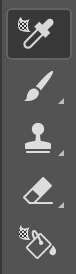
Bei beiden Werkzeugen ist ein kleines ominöses Fähnchen dran.

Weiß jemand von euch, wie ich die beiden Werkzeuge wieder funktionsfähig mache?

Und was das Fähnchen zu bedeuten hat?

Grüße an euch
This topic has been closed for replies.
Correct answer davescm

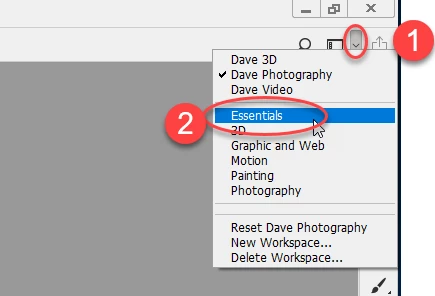
It looks like you are in the 3D workspace. Try going to the top right of your screen. Click the down arrow and choose "Essentials"

Dave

3 replies

davescm
Community Expert
davescmCommunity ExpertCorrect answer
Community Expert
May 30, 2018

It looks like you are in the 3D workspace. Try going to the top right of your screen. Click the down arrow and choose "Essentials"

Dave

Participant
May 30, 2018

It works!

Thank you very much!

c.pfaffenbichler
Community Expert
Community Expert
May 30, 2018

And which Workspace do you have selected (Window > Workspace > …)?

c.pfaffenbichler
Community Expert
Community Expert
May 30, 2018

Could you please post a screenshot taken at View > 100% with all the pertinent Panels (Layers, Channels, Options Bar, …) visible?

Which kind of  Layer do you have selected (3D, …)?