Answered
language of the program itself
Ask about the language of the program itself I want to have it in English but it is set up in Danish how can i get an english version
Ask about the language of the program itself I want to have it in English but it is set up in Danish how can i get an english version
To avoid any complications, uninstall the Danish version before you install the English version.
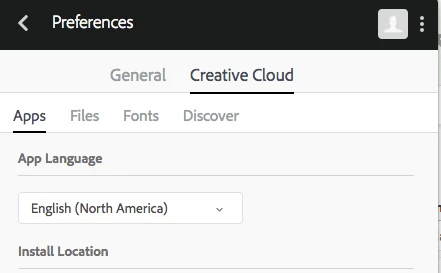
First you would into the Creative Cloud Desktop app that hopefully is installed, and go into Preferences to change the language.
You may not want North America English, so there is an International English option.
Then when you go into the Apps tab, you will see an Install option for Photoshop that will install the English language version.
Already have an account? Login
Enter your E-mail address. We'll send you an e-mail with instructions to reset your password.
 AdChoices